My presentation is here:
My final project can be found at http://ruasist.pbwiki.com and my proposal is at the top of the sidebar on the wiki.
Happy Holidays and best wishes for a happy & healthy New Year for everyone.
Thursday, December 18, 2008

Friday, December 12, 2008
If I were the Queen...
I shouldn't have read everyone else's posts first, because now I feel like I don't have any ideas left...
Readings:
I learned so much in this class, and although it was time-consuming, it was all worth it. I find myself telling people about how great these tools are and even convinced an RU instructor to screencast for her students (thus eliminating one or two old school paper handouts). Now I must work on my final...two due the same day.
Readings:
- Keep Keen because he's a conversation-starter. If you want to replace him with another conversation starter, use danah boyd's class division article instead (I like Laura's suggestion of moving db to earlier in the semester).
- Keep Feed and Farkas.
- Get rid of The Social Life of Information. Some of the chapters are available online if you don't want to let it go completely.
- Limit books by Wired editors to one. My personal preference would be to keep Johnson and use Anderson's "Long Tail" article instead of the book.
- Keep all of it. I do agree with Tara's observation that we probably don't need to set up so many e-mail accounts. I would recommend keeping Google and Yahoo! accounts. After the IM week, I never used the aol account.
- After using the voice chat option in Second Life, I would suggest adding Skype as one of the tools we practice with. It would be especially helpful for troubleshooting, when one person is trying to help another person get something set up.
- I would recommend doing social networking earlier in the semester. It's something that's pretty easy to self-teach, and students can use it throughout the semester.
- I LOVE Amy's suggestion of Club Penguin vs. Second Life. It's easy, fun, doesn't have so many tech requirements, and would be a good introduction into the MMOG metaverse. People who are interested in further exploration could try out SL. Alternatively, if you're going to keep SL, we should plan to have one virtual meeting in there. I had so much more fun with RR and JF than I did when I went by myself.
Interaction:
- I second all the requests for comment continuation on the blogs. My blog feels a little sad when it has posts with zero comments.
- I also second Renee's suggestion that we keep finding "new to us" stuff and bookmark it.
- We probably don't need to subscribe to apophenia. I don't mind reading it, but my reader got cluttered up with danah boyd's vacation notices and pharmacy problems, which I just don't care about.
I learned so much in this class, and although it was time-consuming, it was all worth it. I find myself telling people about how great these tools are and even convinced an RU instructor to screencast for her students (thus eliminating one or two old school paper handouts). Now I must work on my final...two due the same day.
Labels:
scils598,
suggestions

Thursday, December 11, 2008
Being Steven Johnson
"But when you immerse yourself in a book, you get a different sort of experience: you enter the author's mind, and peer out at the world through their eyes" (p. 186).
This also is a great description of what happens in Being John Malkovich, which is a movie I happen to love. Anyway, I've spent enough time looking out through Steven Johnson's eyes that I'm pretty sure I would avoid him at a party. With few exceptions, he and I do not like the same shows, movies, or games. It turns out that I am exactly like the BBC responder who was "shocked" that Johnson could write a pop culture book without any references to Buffy the Vampire Slayer (p. 203). My primary objections are not so much what he leaves out, but what he includes, mostly because I don't like so many of his examples.
His argument? I buy it. I complained in my last post that he didn't really talk about how much new technology has played a part in increased cognitive development. He covers that in Part 2, and I think the overall points he makes about the complexity of material and technology making us smarter are valid.
I strongly disagree with him that the content can be easily separated from the cognitive challenge the material presents. As a parent, I do not ever, under any circumstances, see myself recommending Grand Theft Auto to my kids (or my husband), no matter how much of a cognitive challenge it may present. However, as an interactive family activity, I have let my children watch my husband play Tomb Raider, Shadow of the Colossus and [blush] Resident Evil. The spectator kids can keep track of my husband's entire inventory, tell him which weapons are most effective, and they play complex imaginary games based on characters from the games (e.g., in one scenario, Lara Croft (TR) and Jill Valentine (RE) are best friends). My son, who does not like writing for school, writes lists of weapons, ammo, passwords, hints and draws maps for the game. My daughter reads our favorite walkthroughs when my husband gets stuck. As the family moral compass, I am in the room reading a book and vocally disapproving of violent video games. I have seen firsthand how quickly and easily the kids can absorb complex game stories, strategies, etc. and apply what they learn in one game to another. We have also had some interesting discussions about gun violence, what would happen if you jumped off a building in the real world, etc. As an unexpected bonus for me, video gaming has led my kids to look for new books in the library on a variety of subjects ranging from military weaponry to what the inside of a real Hindu temple looks like.
So, overall, I'd say playing games, watching tv, and surfing the net are all good for you...in moderation and with adult supervision, of course. For libraries and educational institutions, this means recognizing that incorporating various media types is becoming increasingly necessary to help patrons/students develop 21st century problem-solving skills.
This also is a great description of what happens in Being John Malkovich, which is a movie I happen to love. Anyway, I've spent enough time looking out through Steven Johnson's eyes that I'm pretty sure I would avoid him at a party. With few exceptions, he and I do not like the same shows, movies, or games. It turns out that I am exactly like the BBC responder who was "shocked" that Johnson could write a pop culture book without any references to Buffy the Vampire Slayer (p. 203). My primary objections are not so much what he leaves out, but what he includes, mostly because I don't like so many of his examples.
His argument? I buy it. I complained in my last post that he didn't really talk about how much new technology has played a part in increased cognitive development. He covers that in Part 2, and I think the overall points he makes about the complexity of material and technology making us smarter are valid.
I strongly disagree with him that the content can be easily separated from the cognitive challenge the material presents. As a parent, I do not ever, under any circumstances, see myself recommending Grand Theft Auto to my kids (or my husband), no matter how much of a cognitive challenge it may present. However, as an interactive family activity, I have let my children watch my husband play Tomb Raider, Shadow of the Colossus and [blush] Resident Evil. The spectator kids can keep track of my husband's entire inventory, tell him which weapons are most effective, and they play complex imaginary games based on characters from the games (e.g., in one scenario, Lara Croft (TR) and Jill Valentine (RE) are best friends). My son, who does not like writing for school, writes lists of weapons, ammo, passwords, hints and draws maps for the game. My daughter reads our favorite walkthroughs when my husband gets stuck. As the family moral compass, I am in the room reading a book and vocally disapproving of violent video games. I have seen firsthand how quickly and easily the kids can absorb complex game stories, strategies, etc. and apply what they learn in one game to another. We have also had some interesting discussions about gun violence, what would happen if you jumped off a building in the real world, etc. As an unexpected bonus for me, video gaming has led my kids to look for new books in the library on a variety of subjects ranging from military weaponry to what the inside of a real Hindu temple looks like.
So, overall, I'd say playing games, watching tv, and surfing the net are all good for you...in moderation and with adult supervision, of course. For libraries and educational institutions, this means recognizing that incorporating various media types is becoming increasingly necessary to help patrons/students develop 21st century problem-solving skills.
Labels:
scils598,
Steven Johnson
Tuesday, December 9, 2008
Freak Show...er...Second Life
I already blogged about my first entry into Second Life. Good times.
FYI, here is my avatar...she's a gamer girl.

On my second excursion inworld, I teleported right to Information Island. I flew around looking at stuff, but no one was there.... I decided to look for a coffee shop, and I found one that said it was noob-friendly, but I didn't make it over to the coffee counter because there was a guy and a girl in there and they were...um...busy. Quit again.
Third time's a charm, right? I am back in the creepy coffee shop, so I use the map to "go home." I find myself in the middle of some sort of fight...Melina somebody-or-other was rude to a couple of other people (one of them is a cake. like a birthday cake?). Profanity is flying and Melina...I mean her avatar...is a nude woman with HUGE...never mind. Entertaining to watch her type, but I am starting to think I must have accidentally set myself up in a mature "red light" zone, so I quit again and consult my husband (more role-playing experience than me).
He swings in and shows me that I'm in a PG zone (like I thought) and that people are just breaking the PG (no bad language/nudity/soliciting sex) rules. Go figure. He figures out the controls pretty quickly and just walks around talking to people, most of whom ignore him. Then a guy comes over, introduces himself, says he's new and doesn't know what's going on. My avatar doesn't either, so we agree to be friends. Then Alix starts IM'ing me, asking am I really a girl? how old? I get the "nice ;]]" and I start hyperventilating and tell my husband to quit because I know where this is going. My husband thinks I'm the freak for freaking out...it turns out my inability to separate myself from my avatar makes it difficult for me to roleplay. I think I would be better at this if my avatar had a job to do, like answer reference questions. Walking around trying to make friends (and getting hit on) makes me feel creepy and weird. Stranger danger!!!
When I log in to my home this morning, some shirtless guy wants to bite me. In the spirit of roleplaying (and Twilight), I say yes. He's no Edward Cullen. Somebody tells me to report him because he's bothering everyone. I am excited to know what a "griefer" is!!

It turns out my "home" is some kind of noob ski lodge (found that out by eavesdropping on some disappointed visitors). I don't know if anyone else was "born" here, but it's a crazy place. Today I found out how to gesture...the "/repulsed" gesture includes me...I mean my avatar...saying "eeeeewww".

This is not the same guy from yesterday. This new avatar/guy gives me the creeps because his gun says "safety off" and he's gigantic. Either my avatar is a freak magnet (possible) or there is a high freak quotient in SL (I'm going with this one). Once again, I teleport to the safety and solitude of Information Island. I think I'll be hanging out here from now on.......

FYI, here is my avatar...she's a gamer girl.

On my second excursion inworld, I teleported right to Information Island. I flew around looking at stuff, but no one was there.... I decided to look for a coffee shop, and I found one that said it was noob-friendly, but I didn't make it over to the coffee counter because there was a guy and a girl in there and they were...um...busy. Quit again.
Third time's a charm, right? I am back in the creepy coffee shop, so I use the map to "go home." I find myself in the middle of some sort of fight...Melina somebody-or-other was rude to a couple of other people (one of them is a cake. like a birthday cake?). Profanity is flying and Melina...I mean her avatar...is a nude woman with HUGE...never mind. Entertaining to watch her type, but I am starting to think I must have accidentally set myself up in a mature "red light" zone, so I quit again and consult my husband (more role-playing experience than me).
He swings in and shows me that I'm in a PG zone (like I thought) and that people are just breaking the PG (no bad language/nudity/soliciting sex) rules. Go figure. He figures out the controls pretty quickly and just walks around talking to people, most of whom ignore him. Then a guy comes over, introduces himself, says he's new and doesn't know what's going on. My avatar doesn't either, so we agree to be friends. Then Alix starts IM'ing me, asking am I really a girl? how old? I get the "nice ;]]" and I start hyperventilating and tell my husband to quit because I know where this is going. My husband thinks I'm the freak for freaking out...it turns out my inability to separate myself from my avatar makes it difficult for me to roleplay. I think I would be better at this if my avatar had a job to do, like answer reference questions. Walking around trying to make friends (and getting hit on) makes me feel creepy and weird. Stranger danger!!!
When I log in to my home this morning, some shirtless guy wants to bite me. In the spirit of roleplaying (and Twilight), I say yes. He's no Edward Cullen. Somebody tells me to report him because he's bothering everyone. I am excited to know what a "griefer" is!!

It turns out my "home" is some kind of noob ski lodge (found that out by eavesdropping on some disappointed visitors). I don't know if anyone else was "born" here, but it's a crazy place. Today I found out how to gesture...the "/repulsed" gesture includes me...I mean my avatar...saying "eeeeewww".

This is not the same guy from yesterday. This new avatar/guy gives me the creeps because his gun says "safety off" and he's gigantic. Either my avatar is a freak magnet (possible) or there is a high freak quotient in SL (I'm going with this one). Once again, I teleport to the safety and solitude of Information Island. I think I'll be hanging out here from now on.......

Labels:
freaks,
scils598,
Second Life
Monday, December 8, 2008
"Not everything is sunshine and daisies"...
I'm in Second Life. I've got a cool avatar. I've been standing in the same place for about 5 minutes (going through the tutorial) when a guy approaches...
We exchange small talk...
hi/hi
are you from turkey?/us
what's your name? (we exchange our 2nd life names)
want to go?/where?
sex/no thanks
please??????/bye
We exchange small talk...
hi/hi
are you from turkey?/us
what's your name? (we exchange our 2nd life names)
want to go?/where?
sex/no thanks
please??????/bye
If only I were screencasting. It would cut to him frantically typing "sorry" and me frantically pressing the "quit" button (yes, yes, get me out of here).
I am wondering two things...
1) Does 2nd life have pepper spray?
2) Is it possible that Gabber Delicioso might be a hooker name?
Labels:
daisies,
proposition,
scils598,
Second Life,
sunshine
Sunday, December 7, 2008
I choose Wii!
I'm the part-time youth services librarian at my local branch library. We live in a suburban community. My main responsibility is to program for middle-school aged students. We have one large community room with a widescreen tv. I would like to get some gaming equipment that will work in that room with our existing tv for tournament-type events.
How would you research?
* I would ask my patrons what they would like to see in the library. I would also look at whether any other libraries have successfully implemented a gaming program and what they are using.
What would your criteria be?
* Money! How much money do I have 1) for a system, and 2) for games.
* The equipment can only be used in the community room (that's where our only tv is), so it has to work with our existing equipment.
* Our library is small, so games need to be family-oriented (suitable for sibling and/or grandparent spectators).
Which do you think you would get?
* Like so many others, I would choose the wii. The wii can be used by disabled patrons, it has lots of family-friendly games that students enjoy playing, and the whole system is less expensive than the PS3 (which the kids are clamoring for). The wii accessories (e.g., extra remotes) are reasonably priced, and the system has a good track record for durability and ease of use. Other libraries in my area are successfully using the wii for gaming in the library, which makes it easier for me to justify to my superiors!
How would you research?
* I would ask my patrons what they would like to see in the library. I would also look at whether any other libraries have successfully implemented a gaming program and what they are using.
What would your criteria be?
* Money! How much money do I have 1) for a system, and 2) for games.
* The equipment can only be used in the community room (that's where our only tv is), so it has to work with our existing equipment.
* Our library is small, so games need to be family-oriented (suitable for sibling and/or grandparent spectators).
Which do you think you would get?
* Like so many others, I would choose the wii. The wii can be used by disabled patrons, it has lots of family-friendly games that students enjoy playing, and the whole system is less expensive than the PS3 (which the kids are clamoring for). The wii accessories (e.g., extra remotes) are reasonably priced, and the system has a good track record for durability and ease of use. Other libraries in my area are successfully using the wii for gaming in the library, which makes it easier for me to justify to my superiors!
Steven Johnson vs. Bugs Bunny
Is popular culture (games, tv, film) just a method to "sophisticatedly deliver stupidity" (paraphrasing George Will)? Was it ever? I generally agree with Johnson that there is something to be said for engagement with media and the resulting skill sets that can be developed. I guess my problem is that I think this has been the case all along, and that we, as both consumers and producers, are simply adapting to more sophisticated and interactive media.
Johnson doesn't spend a lot of time talking about ubiquitous modern media and our unprecedented access to it. When I was a kid, there were about 8 channels to choose from (3 networks and 5 UHF/VHF channels). I listened to records or whatever was on the radio and was pretty jealous of my friend's mom's awesome 8-track in the car. My dad was the video gamer who played Time Pilot late into the night...
A big problem I have with Part 1 is that I feel as though Johnson glosses over the importance of technological advances and how they have contributed to the complexity of the games/shows/movies, etc. that he is discussing. More sophisticated graphics, special effects, and programming capabilities allow for more sophisticated storytelling. System portability allows users/viewers to access modern media when it's convenient for them. If they don't "get" a Seinfeld or Simpsons reference, they can pause the show and Google it. As he describes the highbrow(?) Simpsons as a model for a show that "contains a joke that makes sense only if the viewer fills in the proper supplementary information" (p. 85), I think he must have missed out on Bugs Bunny as Rabbit Hood:
Some other classic Bugs that you may enjoy (if only for the trip down memory lane):
What's Opera, Doc? and Rabbit of Seville
So far, Johnson isn't saying anything to me that's really new. We'll see if that changes in Part 2.
Johnson doesn't spend a lot of time talking about ubiquitous modern media and our unprecedented access to it. When I was a kid, there were about 8 channels to choose from (3 networks and 5 UHF/VHF channels). I listened to records or whatever was on the radio and was pretty jealous of my friend's mom's awesome 8-track in the car. My dad was the video gamer who played Time Pilot late into the night...
A big problem I have with Part 1 is that I feel as though Johnson glosses over the importance of technological advances and how they have contributed to the complexity of the games/shows/movies, etc. that he is discussing. More sophisticated graphics, special effects, and programming capabilities allow for more sophisticated storytelling. System portability allows users/viewers to access modern media when it's convenient for them. If they don't "get" a Seinfeld or Simpsons reference, they can pause the show and Google it. As he describes the highbrow(?) Simpsons as a model for a show that "contains a joke that makes sense only if the viewer fills in the proper supplementary information" (p. 85), I think he must have missed out on Bugs Bunny as Rabbit Hood:
Some other classic Bugs that you may enjoy (if only for the trip down memory lane):
What's Opera, Doc? and Rabbit of Seville
So far, Johnson isn't saying anything to me that's really new. We'll see if that changes in Part 2.
Labels:
Bugs Bunny,
scils598,
Steven Johnson
Find Four (or not)
My kids use Club Penguin to play interactive games, so I tried "Find Four" in the ski lodge. I lost.
Here is a link to the screencast of my ignominious defeat. (Not embedding due to previously discussed gigantism issues with Jing embeds).
Here is a link to the screencast of my ignominious defeat. (Not embedding due to previously discussed gigantism issues with Jing embeds).
Friday, December 5, 2008
Screencasting How-To
1) Picture your audience. They can be in their underwear if that helps. I find that I do better screencasts if I envision talking to a particular person or group. I think about what my audience would want to see, and then I show them.
2) Size your screen!! and do a runthrough. I size my screen first, then record a dry run. If I'm doing a one-off that can't be redone (like how to set up an account), I just pretend to do the steps for my first take. Then I watch it to see if everything I wanted made it into the picture (sometimes stuff gets cut off that you're not expecting) and whether I rambled or was too close to the mic for "p". I also watch for delays. Sometimes my process takes longer on the screen while I'm recording than it does when I play it back. Then I know to keep my commentary (more or less) in synch with what "really" happens. Finally, I am not an "ummmer," but I do tend to get off-topic, so my runthrough helps me identify and avoid these pitfalls.
3) Just do it. I make sure my Westminster-chiming clock is far enough away from chiming for me to do my screencast, and I just start talking to my virtual audience, demo the process, and end it. The more you do, the easier it is. Also, if you practice too much or try to make it too perfect, you can get stuck in an endless loop of rerecording, and you don't have time for that!!!
4) File name!! Amy already covered this, but do rename your files. It helps you remember what each one is about and it helps others know what they're going to be watching. You can do it before or after you upload to screencast.com.
FYI, I have been selling Jing as a great way to do quick screencasts. I have also been selling screencasting as a great way for instructors to help students know what they need to do tech-wise for a class. So if you're taking Materials for Young Adults with Jill next semester, you might be getting some screencasting homework (to watch, not to record).
2) Size your screen!! and do a runthrough. I size my screen first, then record a dry run. If I'm doing a one-off that can't be redone (like how to set up an account), I just pretend to do the steps for my first take. Then I watch it to see if everything I wanted made it into the picture (sometimes stuff gets cut off that you're not expecting) and whether I rambled or was too close to the mic for "p". I also watch for delays. Sometimes my process takes longer on the screen while I'm recording than it does when I play it back. Then I know to keep my commentary (more or less) in synch with what "really" happens. Finally, I am not an "ummmer," but I do tend to get off-topic, so my runthrough helps me identify and avoid these pitfalls.
3) Just do it. I make sure my Westminster-chiming clock is far enough away from chiming for me to do my screencast, and I just start talking to my virtual audience, demo the process, and end it. The more you do, the easier it is. Also, if you practice too much or try to make it too perfect, you can get stuck in an endless loop of rerecording, and you don't have time for that!!!
4) File name!! Amy already covered this, but do rename your files. It helps you remember what each one is about and it helps others know what they're going to be watching. You can do it before or after you upload to screencast.com.
FYI, I have been selling Jing as a great way to do quick screencasts. I have also been selling screencasting as a great way for instructors to help students know what they need to do tech-wise for a class. So if you're taking Materials for Young Adults with Jill next semester, you might be getting some screencasting homework (to watch, not to record).
Labels:
best practices,
scils598,
screencasting
Monday, November 24, 2008
Ningalings
SG: What advantages/limitations do you see with using a Ning?
GC: Main advantages are ease of use and selectivity -- you can make an exclusive network "by invitation only". Main limitations are that it's another social network, and there are already plenty out there. Apparently, if you are a NKOTB fan, this is the place to be. Oh yeah, the ads are sooooo annoying (that targeted advertising again). And I think 1-member social networks are really sad.
SG: How could you use a Ning in a work environment?
GC: I don't see Ning replacing a company intranet. I do see Ning as a great way to get your branding/marketing out there, and to promote special events. I think for a library, Ning might be a terrific additional way to let people know about your branch hours or advertise for special programs. I'd like to try using Ning for an online bookclub -- it seems much more user-friendly than a lot of the wikis we test drove this semester, so users might be more likely to participate. I agree with Jen G that this really seems to hold a lot of appeal for educators, and Joyce K. Valenza's TeacherLibrarian group was the only reason I knew about Ning before I took this class....
GC: Main advantages are ease of use and selectivity -- you can make an exclusive network "by invitation only". Main limitations are that it's another social network, and there are already plenty out there. Apparently, if you are a NKOTB fan, this is the place to be. Oh yeah, the ads are sooooo annoying (that targeted advertising again). And I think 1-member social networks are really sad.
SG: How could you use a Ning in a work environment?
GC: I don't see Ning replacing a company intranet. I do see Ning as a great way to get your branding/marketing out there, and to promote special events. I think for a library, Ning might be a terrific additional way to let people know about your branch hours or advertise for special programs. I'd like to try using Ning for an online bookclub -- it seems much more user-friendly than a lot of the wikis we test drove this semester, so users might be more likely to participate. I agree with Jen G that this really seems to hold a lot of appeal for educators, and Joyce K. Valenza's TeacherLibrarian group was the only reason I knew about Ning before I took this class....
Labels:
Ning,
scils598,
social networking
Thursday, November 20, 2008
Facebook Privacy Settings (screencast)
If you're new to facebook, watch my screencast on how to set your privacy settings!
Also check out the great article in danah boyd's blog about facebook privacy settings.
Also check out the great article in danah boyd's blog about facebook privacy settings.
Labels:
danah boyd,
facebook,
privacy,
scils598,
screencasting
Wednesday, November 19, 2008
danah boyd + Library info/lessons = 1 sentence
Libraries who want to effectively reach their patrons by developing a social networking site (SNS) presence cannot limit themselves to one site.
links to danah boyd's articles:
"Social Network Sites: Definition, History and Scholarship"
"Viewing American class divisions through Facebook and MySpace"
links to danah boyd's articles:
"Social Network Sites: Definition, History and Scholarship"
"Viewing American class divisions through Facebook and MySpace"
Labels:
danah boyd,
scils598,
social networking
Social Networking Stickiosity
I think social networking sites like facebook and MySpace are sticky for 3 main reasons:
1) Voyeurism. Look no further than the Nielsen ratings on reality tv shows (using "reality" loosely) and you will see that we love to watch other people. We like to know what's going on with strangers, so how much more fun is it to "spy" on people you know?? The best part is, you're under no obligation to interact. Even if people have strict privacy settings (like me), you can usually see their picture. You can spend hours scouting out profiles!!
2) Fun. There are so many fun things to do on these sites, and they are all just a click away. On facebook, when I'm not posting on people's walls or joining new groups, I play Scavenger Hunt, I take movie quizzes, and I (meanly) superpoke my brother. I also keep in touch with my HUGE extended family, including my Minnesota cousins and my siblings in MA, GA, and IL. On MySpace, once I got my page set up, I found my non-facebooking brother. I also found out that lots of bands, movies, authors, etc. have pages. MySpace has a lot of video and audio content, which is great, and I took the "What Kind of Mixed Drink Are You?" quiz to discover I'm a gin and tonic.
3) Easy. Anyone can use these programs. I would argue that MySpace is more frustrating to set up than facebook and requires more technical know-how, but that might just be me. Within their frameworks, social networking sites provide access to lots of programs and social software tools that users can explore with one click of a mouse.
1) Voyeurism. Look no further than the Nielsen ratings on reality tv shows (using "reality" loosely) and you will see that we love to watch other people. We like to know what's going on with strangers, so how much more fun is it to "spy" on people you know?? The best part is, you're under no obligation to interact. Even if people have strict privacy settings (like me), you can usually see their picture. You can spend hours scouting out profiles!!
2) Fun. There are so many fun things to do on these sites, and they are all just a click away. On facebook, when I'm not posting on people's walls or joining new groups, I play Scavenger Hunt, I take movie quizzes, and I (meanly) superpoke my brother. I also keep in touch with my HUGE extended family, including my Minnesota cousins and my siblings in MA, GA, and IL. On MySpace, once I got my page set up, I found my non-facebooking brother. I also found out that lots of bands, movies, authors, etc. have pages. MySpace has a lot of video and audio content, which is great, and I took the "What Kind of Mixed Drink Are You?" quiz to discover I'm a gin and tonic.
3) Easy. Anyone can use these programs. I would argue that MySpace is more frustrating to set up than facebook and requires more technical know-how, but that might just be me. Within their frameworks, social networking sites provide access to lots of programs and social software tools that users can explore with one click of a mouse.
Labels:
facebook,
MySpace,
scils598,
stickiosity
Thursday, November 13, 2008
My very own Dewey Decimal section!!
How great is this?? Spookily accurate, too... :-)
Gabrielle's Dewey Decimal Section:
832 German drama
Gabrielle = 712895225 = 712+895+225 = 1832
Class:
800 Literature
Contains:
Literature, criticism, analysis of classic writing and mythology.
What it says about you:
You're a global, worldly person who wants to make a big impact with your actions. You have a lot to tell people and you're good at making unique observations about everyday experiences. You can notice and remember details that other people think aren't important.
Find your Dewey Decimal Section at Spacefem.com
Gabrielle's Dewey Decimal Section:
832 German drama
Gabrielle = 712895225 = 712+895+225 = 1832
Class:
800 Literature
Contains:
Literature, criticism, analysis of classic writing and mythology.
What it says about you:
You're a global, worldly person who wants to make a big impact with your actions. You have a lot to tell people and you're good at making unique observations about everyday experiences. You can notice and remember details that other people think aren't important.
Find your Dewey Decimal Section at Spacefem.com
Labels:
Dewey Decimal System,
fun,
scils598
Wednesday, November 12, 2008
Gettin' Jingy wit it...
I discovered (after the fact) that my real-time actions didn't always synch with my end-result video, so there are a few odd delays. Also, constant narration takes some getting used to...there is a completely mute pause near the end while I was discovering that my click didn't work. I see myself screencasting for my mom, who is new to computer use and always wanting someone to show her how to do things (like look at her archived e-mail).
Click the link to view my [somewhat rough] instructional screencast on how to subscribe to the LISSA listserv.
About embedding...I wanted to embed here, but when I used what they gave me, the screencast was giant (and cut off on the right side). I coded the window to be smaller, but then the resolution was bad. I scouted around the Jing website and found this answer to someone else's question: "Just to clarify, you're looking to change the size of the embedded video through the use of embed code? Unfortunately, that doesn't work. Our videos don't scale when you change the dimensions in the embed code." So there you have it. Embedding would be ok for a website, but not good for a blog unless you make your capture area pretty small. (My capture area is in the neighborhood of 800x600).
Click the link to view my [somewhat rough] instructional screencast on how to subscribe to the LISSA listserv.
About embedding...I wanted to embed here, but when I used what they gave me, the screencast was giant (and cut off on the right side). I coded the window to be smaller, but then the resolution was bad. I scouted around the Jing website and found this answer to someone else's question: "Just to clarify, you're looking to change the size of the embedded video through the use of embed code? Unfortunately, that doesn't work. Our videos don't scale when you change the dimensions in the embed code." So there you have it. Embedding would be ok for a website, but not good for a blog unless you make your capture area pretty small. (My capture area is in the neighborhood of 800x600).
Labels:
Jing,
LISSA,
scils598,
screencasting
Tuesday, November 11, 2008
My Top 3 Videos
I think our class did a great job on the videos -- there was something to love about each and every one. I narrowed down my top 3 videos by how hard I laughed while I was watching them...
#3...Amy: "bah, humbug!"
I especially appreciated the photo of the guy poised to trim his nose hair
(@ 0:46).
#2...Tara: "Zelda Fitzgerald's Favorite Recipes - Lesson One"
This video totally debunks the myth that a watched pot never boils and
it has an awesome soundtrack.
#1...Steve: "Learning Aramaic with Steve Caruso: Lesson 1"
What can I say? I was expecting an Aramaic lesson.
I love this video; it's brilliant.
#3...Amy: "bah, humbug!"
I especially appreciated the photo of the guy poised to trim his nose hair
(@ 0:46).
#2...Tara: "Zelda Fitzgerald's Favorite Recipes - Lesson One"
This video totally debunks the myth that a watched pot never boils and
it has an awesome soundtrack.
#1...Steve: "Learning Aramaic with Steve Caruso: Lesson 1"
What can I say? I was expecting an Aramaic lesson.
I love this video; it's brilliant.
Labels:
blip.tv,
favorite videos,
scils598,
YouTube
Sunday, November 9, 2008
Educational vs. Entertainment Videos
Online educational videos may not have the same popularity as entertainment videos, but they will have staying power because of their appeal to a broad user base, both in age and in gender.
Check out these fun facts from page 21 of the PEW/Internet "Online Video" report:
Check out these fun facts from page 21 of the PEW/Internet "Online Video" report:
- "[Educational video] is the only genre of online video, other than movies and TV, where there is gender parity among those who watch."
- "... videos with educational content are equally as popular among the general population of internet users ..."
- "young adult internet users watch or download educational video content at about the same rate as users aged 65 and older (28% vs. 21%)."
Having watched Mike Wesch's educational video presentation, "An anthropological introduction to YouTube," I thought it was cool that "Web 2.0…The Machine is Us/ing Us" is cited in the report as an example of an educational video. He almost makes me want to be an anthropologist...
Labels:
education,
online video,
PEW/Internet,
web 2.0,
YouTube
Our Flickr Photos
"A great photograph is one that fully expresses what one feels, in the deepest sense, about what is being photographed." ~ Ansel Adams

To look at the great photographs our class chose to represent ourselves, click here.

To look at the great photographs our class chose to represent our education, click here.

To look at the great photographs our class chose to represent ourselves, click here.

To look at the great photographs our class chose to represent our education, click here.
Friday, November 7, 2008
Video Conversion (Not Required for Class)
My original idea for an educational video was to demonstrate how to write the cursive alphabet using the Palmer Method. It turned out to be difficult to capture the formation of each letter (but my kids did their best). It is also a fairly slow process which doesn't need narration. So, I wanted to add a soundtrack and speed it up a bit. Much easier said than done...
I take my videos with my Olympus digital camera, which doesn't allow pausing during filming. Also, it uploads video files with .mov extensions, which I can't edit in Windows Movie Maker (WMM). I'm a PC, and my computer is filled with Windows products. I won't bore you with the details of how many freeware converters I tried, or how movavi failed to deliver on its promise (twice).
I will tell you that the free version of the Prism Video Converter is marvelous (and it claims to work for Windows and Mac). I converted my .mov file to a .wmv file, did the soundtrack in Audacity, used WMM to drop in a few still photos and some special effects, and was able to re-convert my final movie back to .mov format!!!! The Prism converter is super easy to use. I noticed two (minor) problems with the converted video: 1) Whether I converted to .avi or .wmv, the converted video was slightly pixillated, and 2) the converted video seemed much shakier than the original. Speeding up the video exaggerates this.
For an amateur video done with a bottom-of-the-line digital camera, I'm happy with the results. I promise this is the last video I'll tag with scils598, but I thought others might be interested in conversions (and/or the Palmer Method).
If you don't want to use the player, go to YouTube or Blip.tv to watch it there.
p.s.- "The quick brown fox jumps over the lazy dog" is used for handwriting practice because it contains every letter of the alphabet.
I take my videos with my Olympus digital camera, which doesn't allow pausing during filming. Also, it uploads video files with .mov extensions, which I can't edit in Windows Movie Maker (WMM). I'm a PC, and my computer is filled with Windows products. I won't bore you with the details of how many freeware converters I tried, or how movavi failed to deliver on its promise (twice).
I will tell you that the free version of the Prism Video Converter is marvelous (and it claims to work for Windows and Mac). I converted my .mov file to a .wmv file, did the soundtrack in Audacity, used WMM to drop in a few still photos and some special effects, and was able to re-convert my final movie back to .mov format!!!! The Prism converter is super easy to use. I noticed two (minor) problems with the converted video: 1) Whether I converted to .avi or .wmv, the converted video was slightly pixillated, and 2) the converted video seemed much shakier than the original. Speeding up the video exaggerates this.
For an amateur video done with a bottom-of-the-line digital camera, I'm happy with the results. I promise this is the last video I'll tag with scils598, but I thought others might be interested in conversions (and/or the Palmer Method).
If you don't want to use the player, go to YouTube or Blip.tv to watch it there.
p.s.- "The quick brown fox jumps over the lazy dog" is used for handwriting practice because it contains every letter of the alphabet.
Picasa Movies (Not Required for Class)
I know, Picasa is another member of the Google empire, but I'm all about streamlining my life. I use Picasa to get my photos off my camera, organize into web slideshows, etc. A recent upgrade (Picasa3) allows you to make videos out of your slideshows and post them directly to YouTube.
My family recently attended a surprise 70th birthday party for my mother-in-law's sister. Unfortunately, cancer therapy prevented my mother-in-law from attending. I made this video for her; it literally took 5 minutes. The tools are not as flexible as Windows Movie Maker (you won't have as many options), but if you like the idea of dragging and dropping your pics into a YouTube video for family & friends, check it out.....
[Background Info: All the photos were taken in Brockton, MA. My in-laws grew up there (they met when they were 12). My MIL is a HUGE Elvis fan.]
You can also view this on YouTube.
My family recently attended a surprise 70th birthday party for my mother-in-law's sister. Unfortunately, cancer therapy prevented my mother-in-law from attending. I made this video for her; it literally took 5 minutes. The tools are not as flexible as Windows Movie Maker (you won't have as many options), but if you like the idea of dragging and dropping your pics into a YouTube video for family & friends, check it out.....
[Background Info: All the photos were taken in Brockton, MA. My in-laws grew up there (they met when they were 12). My MIL is a HUGE Elvis fan.]
You can also view this on YouTube.
Thursday, November 6, 2008
Finger-in-a-Box = Educational
CONTENT WARNING: This video is rated TV-Y7 for fantasy violence. If you faint at the sight of "blood", you might want to skip it.
My grandmother loved to tell ghost stories. When I was a kid, she taught me how to do this awesomely gross trick. With thanks to Mimi for the educational experience, and apologies to my mother for the number of performances, click the player below to find out how to do the not-so-famous finger-in-a-box trick:
You can also go directly to Blip.tv and watch it there.
My grandmother loved to tell ghost stories. When I was a kid, she taught me how to do this awesomely gross trick. With thanks to Mimi for the educational experience, and apologies to my mother for the number of performances, click the player below to find out how to do the not-so-famous finger-in-a-box trick:
You can also go directly to Blip.tv and watch it there.
Labels:
finger-in-a-box,
scils598,
trick
Tuesday, November 4, 2008
Cardigans = Entertainment
Along with glasses and the ability to "shhh", the cardigan is a must-have accessory for every librarian. I'm ready. Here are some (not all) of my cardigans in their very own entertaining (to me) video:
You can also go to YouTube and watch this video there.
You can also go to YouTube and watch this video there.
Labels:
cardigans,
entertainment,
scils598,
vodcasting
Sunday, November 2, 2008
Defending Dewey...
...against Chris Anderson's attack.
One question I think you could ask is whether the taxonomy/ontology of library catalogs somehow prevent patron access to the Long Tail of the library collection. My answer would be an emphatic "no."
"I tremble to think where the Dewey Decimal System will place the book you're reading right now" (p. 161). Of course, I had to look it up. Most libraries who use the DDC have this book in 658.8, which is the broad category for Marketing. I also looked at user tags in Amazon. The most popular tag for the book is...marketing. There are multiple bookmarks for the Long Tail in Delicious...most include "marketing" as a tag. I also looked up the Library of Congress (LC) classification number; it's HF5415.127. In either the DDC or LC classification, the subject headings for the book are: 1) Market segmentation; 2) Internet marketing; 3) Marketing -- Technological Innovations.
I get the whole "Shopping in the Miscellaneous Aisle" concept. I hear Anderson's frustration with the Blockbuster vs. Amazon model, and the constrictions of physical shelves. I generally bypass the genre-guessing at Blockbuster and ask the kid behind the counter where I can find what I'm looking for. Even better, I go to my library, which has an excellent anime collection (for free).
I would argue that, with the information available in a Google search increasing exponentially as I type this post, finding relevant results are more difficult than Anderson wants us to believe. Assuming that I don't know the title or the author of this book, and I use market segmentation as my keywords for a Google search, I get 6,170,000 results. I can select "Books" to narrow my results, and then I'm down to 3,590. If I perform a subject search in the Library of Congress catalog for "market segmentation," I get 115 results, but I do have the opportunity to scroll down the list and narrow my results by geographic location or other variables. I select the 115 results and find Chris Anderson's book at #15 and #16 on the list (original and revised editions).
How many people are going to search for this book using these keywords? I'm not sure. Probably not that many. Most people are going to have something like, "it's that guy from Wired," or "it's a book about internet shopping" or maybe they will even have part of his name or part of the title. Interestingly, the library catalog allows both author name and title searches. Patrons searching by Dewey number are few and far between.
I like to think that the library catalog helps us quickly locate "Long Tail" items for our patrons. Participation in InterLibrary Loan consortia and increasing digitization of collections allows librarians to move beyond the physical constraints of their small libraries. WorldCat finds the book right away, whether I type "marketing segmentation" (#1 on the list), or Chris Anderson, or long tail. I don't have to know the Dewey number, and I don't need special punctuation.
The library catalog helps filter out the "noise" that shows up in internet searching. Open source software promises to find new ways to connect library catalogs and expand access to existing collections. I believe that library catalogs, as they continue to evolve, will provide patrons with the best methods or fulfilling the two Long Tail imperatives that Anderson describes: "1. Make everything available. 2. Help me find it" (p. 218).
One question I think you could ask is whether the taxonomy/ontology of library catalogs somehow prevent patron access to the Long Tail of the library collection. My answer would be an emphatic "no."
"I tremble to think where the Dewey Decimal System will place the book you're reading right now" (p. 161). Of course, I had to look it up. Most libraries who use the DDC have this book in 658.8, which is the broad category for Marketing. I also looked at user tags in Amazon. The most popular tag for the book is...marketing. There are multiple bookmarks for the Long Tail in Delicious...most include "marketing" as a tag. I also looked up the Library of Congress (LC) classification number; it's HF5415.127. In either the DDC or LC classification, the subject headings for the book are: 1) Market segmentation; 2) Internet marketing; 3) Marketing -- Technological Innovations.
I get the whole "Shopping in the Miscellaneous Aisle" concept. I hear Anderson's frustration with the Blockbuster vs. Amazon model, and the constrictions of physical shelves. I generally bypass the genre-guessing at Blockbuster and ask the kid behind the counter where I can find what I'm looking for. Even better, I go to my library, which has an excellent anime collection (for free).
I would argue that, with the information available in a Google search increasing exponentially as I type this post, finding relevant results are more difficult than Anderson wants us to believe. Assuming that I don't know the title or the author of this book, and I use market segmentation as my keywords for a Google search, I get 6,170,000 results. I can select "Books" to narrow my results, and then I'm down to 3,590. If I perform a subject search in the Library of Congress catalog for "market segmentation," I get 115 results, but I do have the opportunity to scroll down the list and narrow my results by geographic location or other variables. I select the 115 results and find Chris Anderson's book at #15 and #16 on the list (original and revised editions).
How many people are going to search for this book using these keywords? I'm not sure. Probably not that many. Most people are going to have something like, "it's that guy from Wired," or "it's a book about internet shopping" or maybe they will even have part of his name or part of the title. Interestingly, the library catalog allows both author name and title searches. Patrons searching by Dewey number are few and far between.
I like to think that the library catalog helps us quickly locate "Long Tail" items for our patrons. Participation in InterLibrary Loan consortia and increasing digitization of collections allows librarians to move beyond the physical constraints of their small libraries. WorldCat finds the book right away, whether I type "marketing segmentation" (#1 on the list), or Chris Anderson, or long tail. I don't have to know the Dewey number, and I don't need special punctuation.
The library catalog helps filter out the "noise" that shows up in internet searching. Open source software promises to find new ways to connect library catalogs and expand access to existing collections. I believe that library catalogs, as they continue to evolve, will provide patrons with the best methods or fulfilling the two Long Tail imperatives that Anderson describes: "1. Make everything available. 2. Help me find it" (p. 218).
Teacher Training Videos
I know there are some other school librarians out there, so I thought I would post this link for you.
http://www.teachertrainingvideos.com/
Russell Stannard uses Camtasia (sound familiar?) to do screencasts of how to use a variety of technology tools. And he has a lovely British accent.
We've learned about most of the tools from Steve, but just in case you eventually lose access to his videos, this is a good backup.
http://www.teachertrainingvideos.com/
Russell Stannard uses Camtasia (sound familiar?) to do screencasts of how to use a variety of technology tools. And he has a lovely British accent.
We've learned about most of the tools from Steve, but just in case you eventually lose access to his videos, this is a good backup.
Friday, October 31, 2008

Thursday, October 30, 2008
Text-Blogging:Podcasting :: Apples:Oranges
Remember the old SAT analogies?? That's what this reminds me of. Blogging and podcasting are both ways to get content to an audience. For me, that's pretty much where the similarity ends.
Characteristics of text-based blogs:
Characteristics of text-based blogs:
- text can be easily translated into different languages by web-based translators
- content can be read carefully or skimmed -- the pace is up to the reader
- easy to incorporate other content (hyperlinks, photos, video clips) within text-based format, making it easy for the reader to go to other sites of interest
- reader is tied to machine where blog can be read
Characteristics of podcasts:
- audio is not easily translated into other languages
- listener generally has to listen to entire podcast; hard to skip around without missing potentially interesting content
- no hyperlinking; photos or video can be included with original post, but may not be as portable as audio files
- portable; can be downloaded and listened to when/where convenient for listener
Both formats allow audience to subscribe to updates, which is convenient. Portability should not be underestimated as a positive feature.
While I'm thinking about text vs. audio, I am reminded of the Seinfeld episode (#140) where George has to read a book about risk management, and he finds he can't do it because he has gotten used to books on tape. He fails an eye exam to get a book-on-tape-for-the-blind, but he can't listen to it, because the voice sounds just like his!
In other words, there is a lot to be said for the method of delivery. Some people's voices are at their best in their writing; others are wonderful to listen to. What works best also has a lot to do with the content. I love listening to stories and other entertaining or engaging audio, particularly when the speaker is dynamic. I am grateful for .pdf files of academic papers; I'm not sure I could stay awake for academic paper podcasts.
One thing I noticed recently that AMC Theaters is doing...they let you read or listen to a synopsis of a movie. I love having both options available! So I'm doing that for you, too.......
You can listen to me read this post, or click the "Listen now" button (up at the top of the post) to hear the odiogo guy read it.
Labels:
blog,
odiogo,
podcasting,
scils598
The Best Christmas Card Ever

Press play on the player above, or click here to hear my story about how I took the best Christmas card picture ever!
Labels:
Christmas card,
podcasting,
scils598
Monday, October 27, 2008
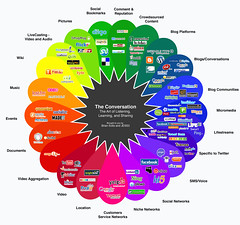
The Conversation Prism
Following MFT's direction to put this in my social software pipe
and smoke it....
and smoke it....
Labels:
Flickr,
scils598,
social software,
web 2.0
Sunday, October 26, 2008
Long-Tailed Librarians
Librarians are New Producers.
We blog about libraries and information. We believe information should be free to all, and we do our best to make it so. Cutting edge libraries are even letting users tag their catalogs, effectively democratizing the ultimate library production tool.
Librarians make New Markets.
It can be argued that librarians are the original aggregators, bringing together (as much as humanly possible) something for everyone. We develop collections, material and digital. We cater to whatever niche markets exist in our communities.
Librarians are New Tastemakers.
"First, let's get one thing straight: The Long Tail is indeed full of crap" (p. 116). Librarians are the tastemakers of the information universe. We pre-filter. We post-filter. We arrange our physical collections...non-fiction, biography, manga, young adult, DVDs, CDs, books on tape, and the list goes on. We catalog and organize our digital collections. We bring order to chaos and don't let people mistake apples for apples.
We blog about libraries and information. We believe information should be free to all, and we do our best to make it so. Cutting edge libraries are even letting users tag their catalogs, effectively democratizing the ultimate library production tool.
Librarians make New Markets.
It can be argued that librarians are the original aggregators, bringing together (as much as humanly possible) something for everyone. We develop collections, material and digital. We cater to whatever niche markets exist in our communities.
Librarians are New Tastemakers.
"First, let's get one thing straight: The Long Tail is indeed full of crap" (p. 116). Librarians are the tastemakers of the information universe. We pre-filter. We post-filter. We arrange our physical collections...non-fiction, biography, manga, young adult, DVDs, CDs, books on tape, and the list goes on. We catalog and organize our digital collections. We bring order to chaos and don't let people mistake apples for apples.
Thursday, October 23, 2008
Chris Anderson's newest economic theory
To read the full Wired article, click here.
To read Andrew Keen's angry opinion about it, click here.
Labels:
Andrew Keen,
Chris Anderson,
scils598,
web 2.0
Wednesday, October 22, 2008
My SCILS
2006/07...Fall: (501) Intro to Library & Information Professions; (530) Principles of Searching; (550) Information Technologies for Libraries and Information Agencies / Spring: (502) Colloquium of Library and Information Studies; (510) Human Information Behavior; (540) Reference Sources & Services / Summer: (555) Multimedia Production; (611:520) Theory and Foundations of Education for the School Library Media Specialist.
Random Reflections...I had to get trifocals after 1 month of school. I took Reference on Saturday. During the summer, my two online classes overlapped by a month, and my husband accused me of having a computer addiction. I loved the IPL experience so much that I volunteered as a Senior Reference Administrator for over a year.
2007/08...Fall: (522) Cataloging and Classification; (547) Materials for Children / Spring: (548) Materials for Young Adults; (611:522) Student Learning Development and Behavior Management for the School Library Media Specialist / Summer: (611:521) Curriculum Design/Integration and Teaching Methodologies for the School Library Media Specialist.
Random Reflections...Cataloging turned out to be one of my most favorite classes. In December, I got hired to work full-time for 6 months at one of the Princeton University Libraries. I started working two days after my interview, and I had to make childcare arrangements during the break before my final presentation in Materials for Children. I did the Spring semester online. My life reached a whole new level of chaos.
2008/09...Fall: (514) Learning, Theory & the Media Center; (598) Social Software Literacy / Spring (anticipated): (575) Management of School Library Media Programs; (592) Field Experience.
Random Reflections...I have "senioritis." I never get enough sleep. I am so grateful that Convocation is not the same day as my daughter's class trip. My heart still beats faster every time I walk into a library. I can see the light at the end of the tunnel. It looks a little bit like this...
To see more photos of my SCILS experience, check out my Flickr set. To find out what our group SCILS experience looks like, click here.
Random Reflections...I had to get trifocals after 1 month of school. I took Reference on Saturday. During the summer, my two online classes overlapped by a month, and my husband accused me of having a computer addiction. I loved the IPL experience so much that I volunteered as a Senior Reference Administrator for over a year.
2007/08...Fall: (522) Cataloging and Classification; (547) Materials for Children / Spring: (548) Materials for Young Adults; (611:522) Student Learning Development and Behavior Management for the School Library Media Specialist / Summer: (611:521) Curriculum Design/Integration and Teaching Methodologies for the School Library Media Specialist.
Random Reflections...Cataloging turned out to be one of my most favorite classes. In December, I got hired to work full-time for 6 months at one of the Princeton University Libraries. I started working two days after my interview, and I had to make childcare arrangements during the break before my final presentation in Materials for Children. I did the Spring semester online. My life reached a whole new level of chaos.
2008/09...Fall: (514) Learning, Theory & the Media Center; (598) Social Software Literacy / Spring (anticipated): (575) Management of School Library Media Programs; (592) Field Experience.
Random Reflections...I have "senioritis." I never get enough sleep. I am so grateful that Convocation is not the same day as my daughter's class trip. My heart still beats faster every time I walk into a library. I can see the light at the end of the tunnel. It looks a little bit like this...

To see more photos of my SCILS experience, check out my Flickr set. To find out what our group SCILS experience looks like, click here.
Tuesday, October 21, 2008
Google Analytics
What's the most popular browser that people use when viewing your blog?
I had 28 visitors; 14 used IE and 14 used Firefox.
What's the most used connection speed?
22 people have T1 (Verizon FiOS?); 5 people have Cable; there is 1 lonely DSL.
Referring Site info (just for fun):
~ 8 visits from blogger.com
~ 5 visits from gcscils598f08.blogspot.com
~ 5 visits from russl.pbwiki.com
~ 3 visits from bloglines.com
~ 1 visit from beta.bloglines.com
~ 1 visit from google.com
~ 1 visit from ljscils598f08.blogspot.com
October 4 was a big day for me...12 views!!!!
(I have no faith in my filter, so at least 4 of those views were probably from me).
Labels:
blog stats,
Google Analytics,
scils598
Friday, October 17, 2008
Long-Tailed Libraries
Well, I wish I could just put Michelle's post here, but I guess that would be considered cheating. I agree with everything she said about the library catering to niche markets all along.
I do think that digitization is making it easier for libraries to provide more resources to their patrons without taking up shelf space. ListenNJ seems like a long tailed initiative, where patrons can access audiobooks without having to go to the library (and the library doesn't have to store the physical materials). I also think services like JerseyCat and WorldCat make it easier for patrons to find what they're looking for, even if it's not at their local library. These services effectively network many libraries into one large entity. While they may not have the unlimited shelf space of Amazon.com, they are certainly expanding the access to material beyond their local constituency. Having a broader audience means it is more likely that materials will be requested, even if it's only once per quarter.
I worry that as digital availability of books and other materials increases, libraries will be under pressure to decrease their physical holdings and become virtual entities (I'm thinking of Amazon again). I hope not. I know at least one book is still around in 2285, so I think we'll be okay.
I do think that digitization is making it easier for libraries to provide more resources to their patrons without taking up shelf space. ListenNJ seems like a long tailed initiative, where patrons can access audiobooks without having to go to the library (and the library doesn't have to store the physical materials). I also think services like JerseyCat and WorldCat make it easier for patrons to find what they're looking for, even if it's not at their local library. These services effectively network many libraries into one large entity. While they may not have the unlimited shelf space of Amazon.com, they are certainly expanding the access to material beyond their local constituency. Having a broader audience means it is more likely that materials will be requested, even if it's only once per quarter.
I worry that as digital availability of books and other materials increases, libraries will be under pressure to decrease their physical holdings and become virtual entities (I'm thinking of Amazon again). I hope not. I know at least one book is still around in 2285, so I think we'll be okay.
Google Docs and Group Projects
I'm in my third year at SCILS, so I have suffered throu..ahem..enjoyed participating in many group projects. My classes have been split about 50/50 between on-campus and online.
1) I have actually been REQUIRED by a professor (online professional development education class) to use Google docs as a group collaborative tool. She could keep track of our progress on the assignment and who was doing what. We didn't have to deal with endless rounds of e-mailed documents, or God forbid, multiple versions attached to eCompanion posts.
2) Once I used Google docs in my online class, I forced everyone I ever collaborated with on campus to use it, too. Why mess around with e-mails and phone calls or drive to New Brunswick if you don't have to????
For students, Google docs is a godsend. E-mailing document versions back and forth is confusing, and there is always a lot of waiting. Using Google docs, if someone in your group hasn't logged in for 3 days, you can tell, and get on them about it. Also, Google docs allows multiple editors at the same time. This is a huge advantage over other collaborative programs, like pbwiki, where only one person at a time can edit a page.
When I use Google docs, I have found a couple of things work really well:
- previously formatted documents uploaded from Word or PowerPoint; usually only minor tweaking needed when you reload it to the original program for final presentation.
- different font colors help participants identify what has been added and by whom. You can use one doc to have an asynchronous conversation about the project; this can be separate from your "official" project doc.
- collecting links to resources in one document provides a ready-made reference list, which comes in really handy when you're doing the works cited page.
Of course, Google docs isn't foolproof. If you mix up someone's e-mail address, they can't access the document. If you have multiple Google accounts, like me, it's easy to get mixed up about which documents you can access from which account. Also, I find the eden.rutgers.edu site on Google very confusing. I can never seem to get there without clicking the document link that somebody e-mails me, which I guess is a minor inconvenience, but it's annoying nonetheless. As a collaborative tool, though, Google docs is time-saving, offers lots of presentation options, and you can control who has access to your document and what they can do with it.
I wish professors who assign group projects would recommend using Google docs. If you're worried about Google taking over the world (or learning everything there is to know about you), there are alternatives, like Sakai. In my experience, online professors do recommend using online collaborative tools. I wonder whether campus professors lack familiarity with online collaboration tools? When you are accustomed to meeting with people F2F, it's easy to overlook the potential benefits of online collaborative tools. I find that on-campus students (me included) tend to assume that group collaboration means physically getting together at some point, and that doesn't have to be the case.
Beginning in January 2009, incoming MLIS students who attend the tech bootcamps will be introduced to Google docs and Delicious as valuable (free!) tools for group collaboration. I'm hoping this will influence new students to think differently about the way they approach group projects!
1) I have actually been REQUIRED by a professor (online professional development education class) to use Google docs as a group collaborative tool. She could keep track of our progress on the assignment and who was doing what. We didn't have to deal with endless rounds of e-mailed documents, or God forbid, multiple versions attached to eCompanion posts.
2) Once I used Google docs in my online class, I forced everyone I ever collaborated with on campus to use it, too. Why mess around with e-mails and phone calls or drive to New Brunswick if you don't have to????
For students, Google docs is a godsend. E-mailing document versions back and forth is confusing, and there is always a lot of waiting. Using Google docs, if someone in your group hasn't logged in for 3 days, you can tell, and get on them about it. Also, Google docs allows multiple editors at the same time. This is a huge advantage over other collaborative programs, like pbwiki, where only one person at a time can edit a page.
When I use Google docs, I have found a couple of things work really well:
- previously formatted documents uploaded from Word or PowerPoint; usually only minor tweaking needed when you reload it to the original program for final presentation.
- different font colors help participants identify what has been added and by whom. You can use one doc to have an asynchronous conversation about the project; this can be separate from your "official" project doc.
- collecting links to resources in one document provides a ready-made reference list, which comes in really handy when you're doing the works cited page.
Of course, Google docs isn't foolproof. If you mix up someone's e-mail address, they can't access the document. If you have multiple Google accounts, like me, it's easy to get mixed up about which documents you can access from which account. Also, I find the eden.rutgers.edu site on Google very confusing. I can never seem to get there without clicking the document link that somebody e-mails me, which I guess is a minor inconvenience, but it's annoying nonetheless. As a collaborative tool, though, Google docs is time-saving, offers lots of presentation options, and you can control who has access to your document and what they can do with it.
I wish professors who assign group projects would recommend using Google docs. If you're worried about Google taking over the world (or learning everything there is to know about you), there are alternatives, like Sakai. In my experience, online professors do recommend using online collaborative tools. I wonder whether campus professors lack familiarity with online collaboration tools? When you are accustomed to meeting with people F2F, it's easy to overlook the potential benefits of online collaborative tools. I find that on-campus students (me included) tend to assume that group collaboration means physically getting together at some point, and that doesn't have to be the case.
Beginning in January 2009, incoming MLIS students who attend the tech bootcamps will be introduced to Google docs and Delicious as valuable (free!) tools for group collaboration. I'm hoping this will influence new students to think differently about the way they approach group projects!
Labels:
Google Documents,
group projects,
Sakai,
scils598
Bookmark introduction?
Hmmm. I like the idea, although you would have to make the notes mandatory (not everyone added them). I think it would be very easy to to have people use delicious earlier in the class. It's fun to do some trendspotting, like the fact that so many classmates enjoy wine, tea, and/or chocolate! Two of us are married to IP attorneys!! Who knew?
Looking at the "final product," or the link that you provide for tags from the whole group is confusing (and a little overwhelming) for me. The tags aren't sorted by person (and I can't figure out how to make them do that), so it takes some work to figure out who tagged what, which detracts a little bit from the "getting to know you" factor. Going person-by-person in my network is fun, and that might help people get the hang of the whole network thing. For me, the best part about the bookmarks was subscribing to the feed for scils598f08, so I got a few each day and it was very easy to see who was bookmarking what. I like learning RSS before delicious, so I'd say, leave it where it is.
Looking at the "final product," or the link that you provide for tags from the whole group is confusing (and a little overwhelming) for me. The tags aren't sorted by person (and I can't figure out how to make them do that), so it takes some work to figure out who tagged what, which detracts a little bit from the "getting to know you" factor. Going person-by-person in my network is fun, and that might help people get the hang of the whole network thing. For me, the best part about the bookmarks was subscribing to the feed for scils598f08, so I got a few each day and it was very easy to see who was bookmarking what. I like learning RSS before delicious, so I'd say, leave it where it is.
Labels:
delicious,
scils598,
social bookmarking
pbwiki vs. wikispaces
Both of these hosted wikis offer free versions and are relatively easy to set up.
Some highlights from both:
Some highlights from both:
- search box
- navigation sidebar
- WYSIWYG editors
- wiki themes/skins (options are limited for free accounts)
- option for RSS feeds
- version control
- cute peanut butter (and jelly!) sandwich icon
- ad-free
- allows private wikis with free accounts
- easy to edit html
- the wiki says you can tag your pages, but I can't figure out how**
- sidebar (navigation) must be manually edited
- some skill needed to figure out how to add widgets, etc.
- very cool portfolio feature converts selected wiki pages to slideshow, pdf or word doc
- can convert entire wiki to pdf
Final verdict: pbwiki is easy to use, but having some knowledge of html is helpful in formatting pages the way you want them to be. Presentation capabilities are fantastic and are available to free accounts. No advertising and ability to make content private make this an excellent wiki to use for a variety of collaborative efforts, from school projects to intraoffice policy manuals.
- cute banzai tree(?) icon
- ads
- does not allow private wikis with free accounts (only protected or public)
- not easy to edit html (not actually sure they use html)
- option to tag pages while editing
- navigation menu automatically updated when pages are added (and can be edited, if desired)
- really easy to add widgets
- automatically adds Creative Commons license to pages
Final verdict: wikispaces is really easy to set up, is more user-friendly for novices, so would be a great choice for group collaboration or any projects where quick setup is key and privacy of content is not an issue.
** I finally (accidentally) clicked on the + and tagged my wiki page!!!! Not an intuitive process.
Labels:
pbwiki,
scils598,
wikispaces
Monday, October 13, 2008
Shelfari
Do you love to read? Would you like to keep track of the books you have read, are reading, or would like to read? Try Shelfari! Shelfari is advertised as "The Site for Books and Readers," and it is so easy to use. Once you register for your free account, you can start adding books to your collection. Just click "Add a Book," and you can type the title, author, ISBN or subject of the book you want to add. An advanced search feature is available if you need more options. When you find the book you are looking for, you can simply click "Add to Shelf," and select "I plan to read," "I'm reading now," or "I've read." That's it!! The first book is on your shelf, and you can go from there. Once you have a book on your shelf, when you hover over it, a cool pop-up box shows whether you've written a review, tagged the book, or rated it (5-star system).
 You can use this service to keep track of your own reading interests, but you can also get involved in the Shelfari social network. You can join groups of like-minded readers, get book recommendations, and make them, too! There are lots of options for customizing (I chose Black Cherry), and you can choose the privacy settings that you're comfortable with. If you don't like the graphic view of the bookshelf, just switch over to the list view. Well, what are you waiting for? Check out my public profile, then create your own!
 You can use this service to keep track of your own reading interests, but you can also get involved in the Shelfari social network. You can join groups of like-minded readers, get book recommendations, and make them, too! There are lots of options for customizing (I chose Black Cherry), and you can choose the privacy settings that you're comfortable with. If you don't like the graphic view of the bookshelf, just switch over to the list view. Well, what are you waiting for? Check out my public profile, then create your own!
Labels:
reading,
scils598,
Shelfari,
virtual bookshelf
Sunday, October 12, 2008
del.icio.us vs. ma.gnolia
Magnolias are beautiful flowers, but I find their fragrance to be really cloying and overpowering. So you might be able to see where I'm going with this post...
del.icio.us
del.icio.us
- easy to set up and start using right away
- SUGGESTS TAGS
- easy to bookmark and edit/delete/add notes to bookmarks
- easy to search bookmarks (mine or anyone else's)
- easy to send bookmarks to others (especially if they are in your network)
- easy to bundle classmates into a network group
- easy to export/import bookmarks
- easy to get RSS feeds for every tag
- doesn't seem to have RSS feed for searches (?)
- doesn't save page images
- doesn't search full text of bookmarked web pages
- doesn't allow for private group bookmark sharing (can send to inbox, though)
- confusing setup process
- does not suggest tags
- easy to bookmark and edit/delete/add notes to bookmarks (many descriptions added automatically)
- lots of options to search bookmarks (mine or anyone else's)
- can send bookmarks to others
- group functions are FAR superior to del.icio.us
- easy to export/import bookmarks
- easy to get RSS feeds for every tag AND search results
- saves snapshot of page + makes short URL
- looks pretty + has cute icons (like a martini glass)
- easy to change bookmark from public to private with one click
- too many little icons/links, etc. for each bookmark (confusing)
- I had to spend too much time figuring out preferences
- I liked the old home page a lot better than the new one (found out by clicking "Classic View")
- ads are annoying, especially when I notice they are targeted based on my bookmarks
- don't like rating -- I bookmark stuff I like, so what's the point? Mine would have 4-5 stars for every entry.
Basically, I was frustrated at the outset by the sign up process, and that colored my whole experience. I also don't like the new home page at all. Cataloging was one of my favorite classes, and I adore controlled vocabularies. I'll buy the "can't catalog the web," but I really like it when the tags (mine, at least) are consistent, so del.icio.us wins for me based on this feature alone.
Labels:
delicious,
magnolia,
scils598,
social bookmarking
Musings on Brown & Duguid & the Future of Education
As mentioned in my last B&D post, I'm still feeling a little let down about the quality of information's social life. I'm also aggravated by the use of "pouring" instead of "poring" on p. 119. I'm trying not to let it color my view of the book, but if this was their resume....
I love the idea that knowledge is something you can attach/detach. How often have I wished to be able to perform a Vulcan mind meld on someone and detach their knowledge?? More often than I'd like to admit. The two big ideas I get from Chapter 5 are:
I love the idea that knowledge is something you can attach/detach. How often have I wished to be able to perform a Vulcan mind meld on someone and detach their knowledge?? More often than I'd like to admit. The two big ideas I get from Chapter 5 are:
- Practice makes perfect. Theories are great, but if you can't apply them, you're more information-rich than knowledgeable. Finding a way to share best practices in a community is important to the knowledge development of the community (p. 123-4).
- People matter. Computers are not yet able to take our places. My personal experience this weekend, attending a family function...my brother-in-law took his wife to visit his grandparents' graves. He told her his great-grandparents were buried in the same cemetery, but he didn't know where because Nana (his grandmother) always showed him where they were. That knowledge was "attached" to her, and my brother-in-law didn't think about the fact that he might need it some day. He was eventually able to find the graves he was looking for, but it took a lot more effort than he anticipated. Now he has the knowledge, whereas before, he only had information. People often provide an important link in the information-to-knowledge chain that is not considered until they have been removed from the equation.
These two ideas were on my mind while I read Chapter 8. In one example relating to Hewlett-Packard engineers and Stanford students, B&D note that "the engineers, though they had lower academic credentials coming into the course, consistently outperformed the classroom students when tested on course material" (p. 221). I have to wonder how much of this higher performance by the engineers is due to the fact that they are already "practicing," -- that is, they are in the field and can apply the information they are learning to real-life situations.
I also kept thinking of Karen (Pettigrew) Fisher's work with "Information Grounds" (shout-out to anyone who took HIB). B&D seem to be suggesting that online educational communities lack the type of information ground that is available to on-campus students. Having taken both types of courses myself, I agree with this. In my personal experience, the community that forms among the online classmates is very different than the one that forms among the campus classmates. On campus, we talk about where to eat, what the traffic is like depending on where you live (a lot of one-upping going on here), interesting movies/exhibitions, how to choose an advisor, events on campus, whether you'll ever get a library job, etc. Online, our discussions tend to focus more on topical issues, such as how to set up a blog or how to obtain copies of electronic reference articles. Much time is spent hashing out various technical difficulties, which can be so extremely frustrating for everyone involved.
Unlike information, Brown seems to have an active social life, and he recently wrote "Minds on Fire" for Educause with Richard P. Adler. I think their definition of social learning is relevant to this discussion: "...social learning is based on the premise that our understanding of content is socially constructed through conversations about that content and through grounded interactions, especially with others, around problems or actions" (p. 18). Online educational communities that I have been a part of do engage in this type of "conversation" -- I think we learn a lot from each other. However, the online experience tends to filter out the information ground aspect of the college/university campus, making serendipitous connections and conversations more difficult. This can lead to a continued sense of isolation for online learners and a feeling that they are not a "real" member of the university/college they attend.
Last words: People go to college to get a degree. Duh. Where B&D found people who don't want to admit this is beyond me (p. 214). I'm pretty sure they shouldn't have built their DGB of the future on the University of Phoenix model. And when I'm taking lifelong learning courses, whether it's for a job or because I want to, they better not require anything gradable.
Labels:
Brown Duguid,
future of education,
scils598
Saturday, October 4, 2008
Visions 2020.2 & Feed (bonus post)
In light of our recent "Feed" discussion, and particularly when considering the way Titus and his friends get their information fed to them, I thought you might be interested in paging through this report.
"Visions 2020.2: Student Views on Transforming Education and Training Through Advanced Technologies" solicited information from students about their technology use and what they would like to see invented that will help kids learn in the future. The data was collected in 2004, and if you jump to page 21 of the report, you can see the students' answers -- they are very amusing...
This is my personal favorite..."Give It To Me Straight Up: A significant number of students described physical interfaces with some device, product, or process or some thing that would automatically transfer knowledge directly into the brain. These include: hat, helmet, pill, brain transplant or implant, chewing gum, port or plug in one’s head for downloading information to the brain, injection, implanted microchip, laser beam, eye patch, mask, thinking cap, holographic projection into brain, baseball cap with learning waves, some sort of transmission while sleeping, brainwaves sent from robot, virtual reality headset, and transfer from teacher via a helmet" (p. 22 - emphasis mine).
Awesome.
"Visions 2020.2: Student Views on Transforming Education and Training Through Advanced Technologies" solicited information from students about their technology use and what they would like to see invented that will help kids learn in the future. The data was collected in 2004, and if you jump to page 21 of the report, you can see the students' answers -- they are very amusing...
This is my personal favorite..."Give It To Me Straight Up: A significant number of students described physical interfaces with some device, product, or process or some thing that would automatically transfer knowledge directly into the brain. These include: hat, helmet, pill, brain transplant or implant, chewing gum, port or plug in one’s head for downloading information to the brain, injection, implanted microchip, laser beam, eye patch, mask, thinking cap, holographic projection into brain, baseball cap with learning waves, some sort of transmission while sleeping, brainwaves sent from robot, virtual reality headset, and transfer from teacher via a helmet" (p. 22 - emphasis mine).
Awesome.
Labels:
future of education,
scils598,
Visions 2020.2
RSS & Information Overload
Did I hear Meredith Farkas correctly? Did she say she follows 170 blogs? 170???? Sheesh. It took me several hours to figure out which ones I wanted to add to my wiki page (using the fanciest FeedInformer templates available, of course).
RSS is awesome. I love being able to see whether something I am interested in has been updated. It is definitely a timesaver. I also see potential for following more than just blogs. It seems as though everywhere I look now, I'm noticing the universal symbol for feeds ( )! Library catalog searches, news articles, sports scores...the list goes on. I think RSS is a great tool that can prevent information overload as long as the subscribers don't get too carried away.
)! Library catalog searches, news articles, sports scores...the list goes on. I think RSS is a great tool that can prevent information overload as long as the subscribers don't get too carried away.Also, it turns out I've been using RSS without realizing it -- on my iGoogle home page, on my facebook account, etc. So now I feel cool that I know what it's called. I love it when I can pretend to know what I'm doing!!!
Labels:
information overload,
RSS,
scils598,
web 2.0
StumbleUpon is new to me!
First, a shout-out to my brother, Kevin, who has been sending me stuff he stumbled upon (and telling me to check it out) for at least a year. It's really cool!
StumbleUpon touts itself as "the best way to discover the things you like on the web". Based on the links my brother has sent me, I just assumed this was dedicated to finding weird stuff on the web. Now I realize that's just him.
From the website:
How Does it Work? "StumbleUpon uses "thumbs-up"/"thumbs-down" ratings to form collaborative opinions on website quality. When you stumble, you will only see pages which friends and like-minded stumblers have recommended. This helps you discover great content you probably wouldn't find using a search engine."
I didn't set up my profile yet, but I do plan to, as I found this fun and easy to use. I was initially attracted to these pictures of 70 Amazing Futuristic & Crazy Computer Cases, which led me to stumble upon Free Geekery, which I wound up bookmarking, and Home Decor for Absolute Geeks, which is very entertaining.
In a different stumbling excercise, I loved Tastespotting (I think you will too, LA) so much that I would up "stumbling around" in there and answering the "lonely Boston cream cupcake looking for friendship" personal ad....
I can't wait to mess around with this some more, and I definitely recommend it just for the "fun" factor!
StumbleUpon touts itself as "the best way to discover the things you like on the web". Based on the links my brother has sent me, I just assumed this was dedicated to finding weird stuff on the web. Now I realize that's just him.
From the website:
How Does it Work? "StumbleUpon uses "thumbs-up"/"thumbs-down" ratings to form collaborative opinions on website quality. When you stumble, you will only see pages which friends and like-minded stumblers have recommended. This helps you discover great content you probably wouldn't find using a search engine."
I didn't set up my profile yet, but I do plan to, as I found this fun and easy to use. I was initially attracted to these pictures of 70 Amazing Futuristic & Crazy Computer Cases, which led me to stumble upon Free Geekery, which I wound up bookmarking, and Home Decor for Absolute Geeks, which is very entertaining.
In a different stumbling excercise, I loved Tastespotting (I think you will too, LA) so much that I would up "stumbling around" in there and answering the "lonely Boston cream cupcake looking for friendship" personal ad....
I can't wait to mess around with this some more, and I definitely recommend it just for the "fun" factor!
Labels:
scils598,
StumbleUpon,
web 2.0
More Musings on "Feed"
The society described in "Feed" makes me sad. I can totally live my life without using IM, but I can see the crippling disadvantages of being the only one at my company that couldn't mentally IM -- talk about being out of the loop! There are a lot of things that bother me about "Feed" society. The disadvantages of not having the feed and the idea that "resistance is futile" and those who fight against it further disadvantage themselves are particularly upsetting. But most distressing to me is the complete loss of privacy. I hate the idea of everyone knowing where I am (and potentially what I'm doing) at any given time. Quite frankly, I can't imagine anything worse than knowing my dad had a (ahem) physical response to a female colleague (unless it's the filet farm). There is definitely such a thing as too much information. The widespread cultural acceptance of the loss of privacy is profoundly disturbing to me. I don't want that to be my future.
I think we are closer than we might like to admit to the society described in "Feed." Of course, as I discussed in my last post, targeted advertising is nothing new, but what is new is the amount of information we share about ourselves in the digiverse. Most of the sites I have registered for this semester know my name, my gender and my date of birth, and sometimes my geographic location. Depending on how many personal details I give after I've registered, the site may know my astrological sign, my favorite color, and what type of music I prefer. Using information pushing methods, like RSS, of which I may not be aware, the site and its networked colleagues can send me information about things that I already like. This cuts down on the amount of time I need to spend looking for information about things I like, and it is highly possible that I will come to rely on this type of feed. I don't believe that people will willingly take the next step to have technology implanted in their brains. Unless we're already living in the matrix, I'm pretty sure everyone knows that cybernetic technology is dangerous and that computers and their programs will seize any opportunity to try to take over the world. Of course, I could be wrong...
I think we are closer than we might like to admit to the society described in "Feed." Of course, as I discussed in my last post, targeted advertising is nothing new, but what is new is the amount of information we share about ourselves in the digiverse. Most of the sites I have registered for this semester know my name, my gender and my date of birth, and sometimes my geographic location. Depending on how many personal details I give after I've registered, the site may know my astrological sign, my favorite color, and what type of music I prefer. Using information pushing methods, like RSS, of which I may not be aware, the site and its networked colleagues can send me information about things that I already like. This cuts down on the amount of time I need to spend looking for information about things I like, and it is highly possible that I will come to rely on this type of feed. I don't believe that people will willingly take the next step to have technology implanted in their brains. Unless we're already living in the matrix, I'm pretty sure everyone knows that cybernetic technology is dangerous and that computers and their programs will seize any opportunity to try to take over the world. Of course, I could be wrong...
Sunday, September 28, 2008
Musings on "Feed"
This book is so meg rad...there is something about it that I really love (2nd time reading it)!
SG: "What do you think of Anderson's idea of the future?"
GC: "It's horrifying."
SG: "Possible?"
GC: "I really hope not."
SG: "Desireable?"
GC: "No."
M.T. Anderson has really hit on something that is (to me) quite frightening...the corporate manipulation of the collective American mind. (I won't talk about the Borg again, but I'm pretty sure they're relevant here). I didn't realize until I had kids how powerful advertising can be. My family, in general, watches a fair amount of television, and my kids can recite certain ads (that I don't even notice) verbatim. If you do watch TV, you are likely to notice the following patterns in advertising...
SG: "What do you think of Anderson's idea of the future?"
GC: "It's horrifying."
SG: "Possible?"
GC: "I really hope not."
SG: "Desireable?"
GC: "No."
M.T. Anderson has really hit on something that is (to me) quite frightening...the corporate manipulation of the collective American mind. (I won't talk about the Borg again, but I'm pretty sure they're relevant here). I didn't realize until I had kids how powerful advertising can be. My family, in general, watches a fair amount of television, and my kids can recite certain ads (that I don't even notice) verbatim. If you do watch TV, you are likely to notice the following patterns in advertising...
- Commercials during women's shows = tampons, birth control, department/bargain stores, shoes, debt management.
- Commercials during men's shows = Viagra, Cialis, beer, pickup trucks, debt management.
- Commercials during kid's shows = toys, minivans, debt management.
Wait a minute, why minivan and debt management commercials on shows whose target audience is children? My son says, "Those are for the moms that might be watching." To a certain extent, he's right, but I also think it might be because advertisers know that kids wield tremendous marketing power. Just because the feed is, as Amy so aptly phrased it in her post, "less...physically invasive", does not mean it's not there already.
For those of us who shop online, use e-mail, or surf the Internet, our online feeds can be more individually tailored. I recently got an e-mail (in my gmail account) that a classmate was following me on Twitter. When I opened the e-mail, this sponsored link appeared at the top of my inbox: "How Twitter Can Help at Work" from the NYT. If I had not been reading "Feed," I probably wouldn't have given this a second thought. Since I was reading "Feed," I felt a shudder at the insidious nature of online tracking. Could this be a coincidence? Maybe. I am not generally a conspiracy theorist, but it does make me pause and wonder who has access to all this information about me? And what might they be using it for?
I recently saw this "real" bionic woman on 20/20 (or Primetime), and it made me wonder if having a feed implant is really that far off. I hope so. I can always delete my cookies, turn off my computer, and read a book instead of watching tv. I like to believe that having my own thoughts (and keeping them private) is something that will always be an option for me and my family. Also, I can't imagine anything more disgusting than a filet mignon farm.
That's it for now. The ShamWow guy is on, and my family wants me to watch...
Saturday, September 27, 2008
Bloglines vs. Google Reader
Before this week, I had never used Bloglines or Google Reader, so here are my bullets about each:
Bloglines (+)
- Setup was pretty easy, after I got over the default "Blog" tab, which I thought might mean "subscribe to blogs," but really meant "set up a Bloglines blog" (don't worry, I stopped the setup in time).
- Feed subscriptions arranged themselves alphabetically, which I like. I did check out the "Edit" feature, where I can make changes to this.
- I dragged a "Sub with Bloglines" button onto my Firefox bookmark bar (I think that's what it's called). Whenever I'm looking at a blog I like, I click to button to subscribe. :-)
- I like the options for customizing the search feature (on the right side of the screen), where I can search "My Feeds" for a search term like "bloglines" and see all the posts from my feeds on that topic. Very cool! You can also exclude your feeds, search the web, etc. This is my favorite Bloglines feature.
Bloglines (-)
- I completely agree with Jenna when she says "Bloglines was cumbersome to set up". Too many options to (in my case) de-select when you enter the URL.
- I had a hard time finding where to login from the Bloglines main page. I can't understand why they don't have an "Already a member, sign in" link right in the giant "Register for your Free Account" window.
- I don't like having to go to Bloglines to look at my feeds. I'm lazy! I looked at all the feed options, basic settings, etc., and I can't find a way to make Bloglines send me an e-mail when I have new feeds (if anyone knows how to do this, please let me know).
Google Reader (+)
- Easy to set up, especially if you use a lot of other Google products (which I do).
- Discovered that any blogs I was already following in blogger were already added to my feed subscription list. Sweet!
- Can be added to my iGoogle home page, saving me a "trip" to Google Reader every day. Awesome!
Google Reader (-)
- When I subscribed to SCILS598Announce, I got a huge list of entries. I had to fiddle around with the settings to only show new posts (unlike Bloglines, which defaults to the new post only setting).
- I don't like all the trends, etc. (that I can't get rid of). It reminds me that Google keeps track of everything I'm doing, which I don't like.
Bloglines has some great features, especially the search, but having to go there every day is a deal-breaker for me. I definitely see myself adding Google Reader to my "real" iGoogle home page as a lazy way to keep track of what I'm interested in.
Labels:
Bloglines,
Google Reader,
scils598
Wednesday, September 24, 2008
Web 2.0 "New to Me" = Scrapblog!
Personally, I love the idea of scrapbooking. I have even created some (2 or 3) fantastic mementos from vacations.
Sadly, my good intentions are paving the road to photographic hell. I am the lady on the commercial whose family is trapped inside her digital camera (or in her computer). I also have boxes and bags of photos from the past ?? years of my life and the archival boxes where they will one day be lovingly stored (in order by date or occasion or something). Until that day arrives, I have been satisfying my extended family with .jpg files attached to e-mails.
Sure, I make the occasional flickr web album,
and I also use Picasa,
but those take me almost as long to organize and post as they would if they were actual pictures in an actual album.
So, this leads me to why I immediately focused on the scrapblog link in Kathy Schrock's list of web 2.0 applications. It took me about 7 minutes to put together this lovely 1-pg. scrapblog. I used a preset template, made a few changes with the text, grabbed some photos from my computer, and voila! Here it is........
If you click the "Play" button, you'll see what happened when I selected the "Ken Burns effect" for my photo....
I could happily mess around with this all day (I won't), and I definitely will be trying this in my personal life. Like other photosharing sites, scrapblog is also a community, allowing users to comment on each other's scrapblogs, create and share new templates, etc. They also have a show called "Get Crafty," where you can see short video demos of various techniques. Fun!
How to use this in the library, you ask??
p.s. - I do find it a tiny bit creepy how quickly people were viewing and commenting on my scrapblog. I enjoy crafts as much as the next person, but I get the feeling that some scrapbloggers have a lot of time on their hands...
Sadly, my good intentions are paving the road to photographic hell. I am the lady on the commercial whose family is trapped inside her digital camera (or in her computer). I also have boxes and bags of photos from the past ?? years of my life and the archival boxes where they will one day be lovingly stored (in order by date or occasion or something). Until that day arrives, I have been satisfying my extended family with .jpg files attached to e-mails.
Sure, I make the occasional flickr web album,
and I also use Picasa,
but those take me almost as long to organize and post as they would if they were actual pictures in an actual album.
So, this leads me to why I immediately focused on the scrapblog link in Kathy Schrock's list of web 2.0 applications. It took me about 7 minutes to put together this lovely 1-pg. scrapblog. I used a preset template, made a few changes with the text, grabbed some photos from my computer, and voila! Here it is........
If you click the "Play" button, you'll see what happened when I selected the "Ken Burns effect" for my photo....
I could happily mess around with this all day (I won't), and I definitely will be trying this in my personal life. Like other photosharing sites, scrapblog is also a community, allowing users to comment on each other's scrapblogs, create and share new templates, etc. They also have a show called "Get Crafty," where you can see short video demos of various techniques. Fun!
How to use this in the library, you ask??
- What a great way to easily embed customized "scrapbook" pages into your library blog or website! You could include photos of programs, photos of new books or other materials nestled on their shelves, waiting to be checked out...the possibilities are endless!
- You are not limited to photos! With the pre-set templates, you can quickly make some attention-grabbing ads for upcoming events. In addition to customizable text, there are also options for including video and/or audio!
- Easy, easy, easy to use, but lots of opportunity for customization, if you have the time and/or the inclination. The embed code is right there when you save, making it simple to grab and embed in your website or blog.
- Free! :-)
p.s. - I do find it a tiny bit creepy how quickly people were viewing and commenting on my scrapblog. I enjoy crafts as much as the next person, but I get the feeling that some scrapbloggers have a lot of time on their hands...
Labels:
photosharing,
scils598,
scrapblog,
web 2.0
Saturday, September 20, 2008
Musings on "The Social Life of Information"
.....I will begin by saying I feel a little misled by the title of this book. I expected it to be fun. I anticipated that Information would have an exciting social life. Sadly, this was not the case, at least in the Preface and in Chapter 3. Brown and Duguid paint a compelling portrait of a technological landscape that is not complete unless information is properly situated within its social (human) context. Although technology has been much ballyhooed, for decades, as ultimately having the capability to eliminate human error, Brown and Duguid explain why this continues to be unlikely: "People...are impressive at identifying others as individuals and dealing with them in context--a complex, highly situated form of interaction that computers are unable to replicate" (p. xii).
.....This got me thinking...Computers may be "smarter" than people, but they do not, as yet, have "a-ha" moments. It is unlikely that a computer will connect with a fellow computer and make a serendipitous discovery. The only light bulb that goes off in the computer is the one letting you know the power is on. However, technology provides new methods of connectivity every day, and in the not-so-distant future we can probably look forward to a Borg-like collective mind that represents the fusion of technology and humans, right? "Resistance is futile..." (SNG, "The Best of Both Worlds").
.....Then, I got to Chapter 3, "Home Alone." The home office diary is sure to resonate with anyone who has attempted to make their own way through an ISP setup -- the isolation and (often) ineptitude one feels when trying to install a network at home, the horror of not being able to pick up the interoffice phone and get an IT guy/gal to come look at the problem, the endless calls to unhelpful tech support. It certainly brought back bad memories of my own upgrade from dial-up to broadband, which included many site visits from a variety of technicians and an eventual utility pole replacement (before I could begin the six-hour installation process). It is unlikely that this is the scenario most companies envision when they tout the benefits of telecommuting. I was particularly struck by Brown and Duguid's assertion that "information technology, by ignoring the role played invisibly by the social system, is keeping people out of the home and in the conventional office, and not the other way around" (p. 79). People need to see each other "in context;" humans working in a communal environment can tap into a type of collective intelligence that is not readily available to them in the perceived isolation of their home offices or at their library terminals.
.....Since I haven't read beyond our assignment, I don't know whether Brown and Duguid propose that social networking tools can bridge the existing gap between humans and computers. For me, this reading has made me reflect on the ways in technology allows me to build community with people whom I have not met. Taking online classes allows me to be part of a community of people who can provide the type of "collective knowledge" that Brown and Duguid describe (p. 77). Perhaps social software is the breakthrough technology that can provide the social context that information has been waiting for.... For libraries and librarians, this means engaging actual people (members of the community, not just other librarians) in the rollout of new technologies. We cannot expect that using new technology will automatically appeal to users or attract new users...in fact, it may alienate some of our current users if they think the "old" way of doing things is no longer available to them. Communication with and feedback from the members of our library community is essential if we want to prevent disenfranchisement of our current patrons; outreach and advertising will be necessary to draw in new ones. Perhaps classes/demonstrations should be the first thing on our agenda when we, as librarians, want to implement new tech services in our libraries.
Works Cited
Brown, J.S. & Duguid, P. (2002). The Social Life of Information. Boston, MA: Harvard Business School Press.
Star Trek: The Next Generation. The Best of Both Worlds, Part 1. Air date: 06.18.1990. Stardate: 43989.1.[http://www.startrek.com/startrek/view/library/episodes/TNG/detail/68454.html] Accessed 09.20.2008.
.....This got me thinking...Computers may be "smarter" than people, but they do not, as yet, have "a-ha" moments. It is unlikely that a computer will connect with a fellow computer and make a serendipitous discovery. The only light bulb that goes off in the computer is the one letting you know the power is on. However, technology provides new methods of connectivity every day, and in the not-so-distant future we can probably look forward to a Borg-like collective mind that represents the fusion of technology and humans, right? "Resistance is futile..." (SNG, "The Best of Both Worlds").
.....Then, I got to Chapter 3, "Home Alone." The home office diary is sure to resonate with anyone who has attempted to make their own way through an ISP setup -- the isolation and (often) ineptitude one feels when trying to install a network at home, the horror of not being able to pick up the interoffice phone and get an IT guy/gal to come look at the problem, the endless calls to unhelpful tech support. It certainly brought back bad memories of my own upgrade from dial-up to broadband, which included many site visits from a variety of technicians and an eventual utility pole replacement (before I could begin the six-hour installation process). It is unlikely that this is the scenario most companies envision when they tout the benefits of telecommuting. I was particularly struck by Brown and Duguid's assertion that "information technology, by ignoring the role played invisibly by the social system, is keeping people out of the home and in the conventional office, and not the other way around" (p. 79). People need to see each other "in context;" humans working in a communal environment can tap into a type of collective intelligence that is not readily available to them in the perceived isolation of their home offices or at their library terminals.
.....Since I haven't read beyond our assignment, I don't know whether Brown and Duguid propose that social networking tools can bridge the existing gap between humans and computers. For me, this reading has made me reflect on the ways in technology allows me to build community with people whom I have not met. Taking online classes allows me to be part of a community of people who can provide the type of "collective knowledge" that Brown and Duguid describe (p. 77). Perhaps social software is the breakthrough technology that can provide the social context that information has been waiting for.... For libraries and librarians, this means engaging actual people (members of the community, not just other librarians) in the rollout of new technologies. We cannot expect that using new technology will automatically appeal to users or attract new users...in fact, it may alienate some of our current users if they think the "old" way of doing things is no longer available to them. Communication with and feedback from the members of our library community is essential if we want to prevent disenfranchisement of our current patrons; outreach and advertising will be necessary to draw in new ones. Perhaps classes/demonstrations should be the first thing on our agenda when we, as librarians, want to implement new tech services in our libraries.
Works Cited
Brown, J.S. & Duguid, P. (2002). The Social Life of Information. Boston, MA: Harvard Business School Press.
Star Trek: The Next Generation. The Best of Both Worlds, Part 1. Air date: 06.18.1990. Stardate: 43989.1.[http://www.startrek.com/startrek/view/library/episodes/TNG/detail/68454.html] Accessed 09.20.2008.
Labels:
Brown Duguid,
scils598
Wednesday, September 17, 2008
Blogger vs. WordPress
Blogger (+):
- Super easy to set up and get started.
- Wysiwig editor and easily accessible editing of html.
- Dashboard is easy to use; tabs let you see where you are and what you're doing.
- Simple and clean layout.
- Easy to import/set up gadgets/widgets, etc.
Blogger (-):
- Limited templates to choose from. I don't have the time or the inclination to design my own.
- Only allows for listing of one IM contact in the profile setting.
WordPress (+):
- Beautiful templates! I wished I could choose more than one.
- Wysiwig editor and easily accessible editing of html.
- The html editor includes buttons for links, tags, etc., which makes this html editor better than Blogger's; also adding a link in the "visual" menu gives you the choice to add titles and targets, which is great!
- Easy to add widgets from their list (if they are not on the list, that's another story).
WordPress (-):
- They e-mailed my blog username and password!!!!!!! Aaaaargh.
- They say "howdy" when I sign in. I hate this.
- I had a little trouble adjusting to the Dashboard; it's very different from Blogger's and it took me a while to figure out what I was doing.
- Overall, the layout is very busy and there are so many choices!
- I wasted 1/2 hour trying to embed a twitter flash badge and finally had to settle for an RSS feed. For some reason, WordPress scrubs out most of the code.
- Weird formula for time that I had trouble figuring out (English major). They note that they are working on changing this.
- Snapshots of where links will take you is cool (but sometimes takes a long time to load and can be a little distracting).
For this course, I prefer Blogger. It was fast and easy to set up, and simple to use and modify. If I were going to be blogging a lot, WordPress is really pretty and has lots of bells and whistles. As a novice, I found the WordPress site to be a bit overwhelming.
I'm looking forward to hearing about other people's experiences!
My Favorite Library Blog...
...was harder to find than I first anticipated. Of course, I wanted to follow Steve's advice to look for blogs in an area that is different from what I'm normally doing (school libraries), so I started out by perusing lists of library blogs.
This blog has an annotated bibliography of "Select Librarian/Library Blogs." There are some interesting blogs here, but nothing that really catches my eye, and I'm pretty sure it was current in 2004. Next!
This list of "Library Weblogs" is cool, but it includes a lot of blogs that are not affiliated with libraries and seemingly has not been updated since 2006. Moving on....
Yes! My pick for the best place to find Library blogs is (insert drumroll here) "The Blogging Libraries Wiki"! Divided into easy categories (e.g., Academic, Public, School, and Special), the categories yield beautifully alphabetized lists of library blogs. But what's this, near the top of the page? It says, "Looking for a list of librarian blogs?" Well, no, I'm not right now, but since you asked....
I digress. I won't tell you how many hours I spent with the Annoyed Librarian, A Librarian's Guide to Etiquette, and Miss Information, but it was more than one. I also spent some time reading about a Twitter experiment and admiring this guy.
My favorite library blog is the Camden County Library Teen Zone Blog.
This is my favorite because:
This blog has an annotated bibliography of "Select Librarian/Library Blogs." There are some interesting blogs here, but nothing that really catches my eye, and I'm pretty sure it was current in 2004. Next!
This list of "Library Weblogs" is cool, but it includes a lot of blogs that are not affiliated with libraries and seemingly has not been updated since 2006. Moving on....
Yes! My pick for the best place to find Library blogs is (insert drumroll here) "The Blogging Libraries Wiki"! Divided into easy categories (e.g., Academic, Public, School, and Special), the categories yield beautifully alphabetized lists of library blogs. But what's this, near the top of the page? It says, "Looking for a list of librarian blogs?" Well, no, I'm not right now, but since you asked....
I digress. I won't tell you how many hours I spent with the Annoyed Librarian, A Librarian's Guide to Etiquette, and Miss Information, but it was more than one. I also spent some time reading about a Twitter experiment and admiring this guy.
My favorite library blog is the Camden County Library Teen Zone Blog.
This is my favorite because:
- It is integrated into the library's teen space page.
- The tone and information are both appropriate for the intended audience.
- The links open in the Teen Zone page or in the main library page, so it's very easy to navigate and backtrack.
- When you hover over the links on the left, you get excellent descriptions of what you might find when you click on them.
- Technorati tags take you to earlier blog entries of interest and add a "cool" factor (for me, anyway).
- I couldn't look away from these shoes.
Subscribe to:
Posts (Atom)

