
Friday, October 31, 2008

Thursday, October 30, 2008
Text-Blogging:Podcasting :: Apples:Oranges
Remember the old SAT analogies?? That's what this reminds me of. Blogging and podcasting are both ways to get content to an audience. For me, that's pretty much where the similarity ends.
Characteristics of text-based blogs:
Characteristics of text-based blogs:
- text can be easily translated into different languages by web-based translators
- content can be read carefully or skimmed -- the pace is up to the reader
- easy to incorporate other content (hyperlinks, photos, video clips) within text-based format, making it easy for the reader to go to other sites of interest
- reader is tied to machine where blog can be read
Characteristics of podcasts:
- audio is not easily translated into other languages
- listener generally has to listen to entire podcast; hard to skip around without missing potentially interesting content
- no hyperlinking; photos or video can be included with original post, but may not be as portable as audio files
- portable; can be downloaded and listened to when/where convenient for listener
Both formats allow audience to subscribe to updates, which is convenient. Portability should not be underestimated as a positive feature.
While I'm thinking about text vs. audio, I am reminded of the Seinfeld episode (#140) where George has to read a book about risk management, and he finds he can't do it because he has gotten used to books on tape. He fails an eye exam to get a book-on-tape-for-the-blind, but he can't listen to it, because the voice sounds just like his!
In other words, there is a lot to be said for the method of delivery. Some people's voices are at their best in their writing; others are wonderful to listen to. What works best also has a lot to do with the content. I love listening to stories and other entertaining or engaging audio, particularly when the speaker is dynamic. I am grateful for .pdf files of academic papers; I'm not sure I could stay awake for academic paper podcasts.
One thing I noticed recently that AMC Theaters is doing...they let you read or listen to a synopsis of a movie. I love having both options available! So I'm doing that for you, too.......
You can listen to me read this post, or click the "Listen now" button (up at the top of the post) to hear the odiogo guy read it.
Labels:
blog,
odiogo,
podcasting,
scils598

The Best Christmas Card Ever

Press play on the player above, or click here to hear my story about how I took the best Christmas card picture ever!
Labels:
Christmas card,
podcasting,
scils598
Monday, October 27, 2008
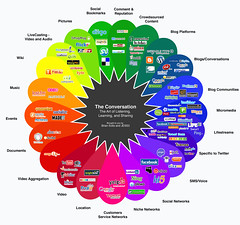
The Conversation Prism
Following MFT's direction to put this in my social software pipe
and smoke it....
and smoke it....
Labels:
Flickr,
scils598,
social software,
web 2.0
Sunday, October 26, 2008
Long-Tailed Librarians
Librarians are New Producers.
We blog about libraries and information. We believe information should be free to all, and we do our best to make it so. Cutting edge libraries are even letting users tag their catalogs, effectively democratizing the ultimate library production tool.
Librarians make New Markets.
It can be argued that librarians are the original aggregators, bringing together (as much as humanly possible) something for everyone. We develop collections, material and digital. We cater to whatever niche markets exist in our communities.
Librarians are New Tastemakers.
"First, let's get one thing straight: The Long Tail is indeed full of crap" (p. 116). Librarians are the tastemakers of the information universe. We pre-filter. We post-filter. We arrange our physical collections...non-fiction, biography, manga, young adult, DVDs, CDs, books on tape, and the list goes on. We catalog and organize our digital collections. We bring order to chaos and don't let people mistake apples for apples.
We blog about libraries and information. We believe information should be free to all, and we do our best to make it so. Cutting edge libraries are even letting users tag their catalogs, effectively democratizing the ultimate library production tool.
Librarians make New Markets.
It can be argued that librarians are the original aggregators, bringing together (as much as humanly possible) something for everyone. We develop collections, material and digital. We cater to whatever niche markets exist in our communities.
Librarians are New Tastemakers.
"First, let's get one thing straight: The Long Tail is indeed full of crap" (p. 116). Librarians are the tastemakers of the information universe. We pre-filter. We post-filter. We arrange our physical collections...non-fiction, biography, manga, young adult, DVDs, CDs, books on tape, and the list goes on. We catalog and organize our digital collections. We bring order to chaos and don't let people mistake apples for apples.
Thursday, October 23, 2008
Chris Anderson's newest economic theory
To read the full Wired article, click here.
To read Andrew Keen's angry opinion about it, click here.
Labels:
Andrew Keen,
Chris Anderson,
scils598,
web 2.0
Wednesday, October 22, 2008
My SCILS
2006/07...Fall: (501) Intro to Library & Information Professions; (530) Principles of Searching; (550) Information Technologies for Libraries and Information Agencies / Spring: (502) Colloquium of Library and Information Studies; (510) Human Information Behavior; (540) Reference Sources & Services / Summer: (555) Multimedia Production; (611:520) Theory and Foundations of Education for the School Library Media Specialist.
Random Reflections...I had to get trifocals after 1 month of school. I took Reference on Saturday. During the summer, my two online classes overlapped by a month, and my husband accused me of having a computer addiction. I loved the IPL experience so much that I volunteered as a Senior Reference Administrator for over a year.
2007/08...Fall: (522) Cataloging and Classification; (547) Materials for Children / Spring: (548) Materials for Young Adults; (611:522) Student Learning Development and Behavior Management for the School Library Media Specialist / Summer: (611:521) Curriculum Design/Integration and Teaching Methodologies for the School Library Media Specialist.
Random Reflections...Cataloging turned out to be one of my most favorite classes. In December, I got hired to work full-time for 6 months at one of the Princeton University Libraries. I started working two days after my interview, and I had to make childcare arrangements during the break before my final presentation in Materials for Children. I did the Spring semester online. My life reached a whole new level of chaos.
2008/09...Fall: (514) Learning, Theory & the Media Center; (598) Social Software Literacy / Spring (anticipated): (575) Management of School Library Media Programs; (592) Field Experience.
Random Reflections...I have "senioritis." I never get enough sleep. I am so grateful that Convocation is not the same day as my daughter's class trip. My heart still beats faster every time I walk into a library. I can see the light at the end of the tunnel. It looks a little bit like this...
To see more photos of my SCILS experience, check out my Flickr set. To find out what our group SCILS experience looks like, click here.
Random Reflections...I had to get trifocals after 1 month of school. I took Reference on Saturday. During the summer, my two online classes overlapped by a month, and my husband accused me of having a computer addiction. I loved the IPL experience so much that I volunteered as a Senior Reference Administrator for over a year.
2007/08...Fall: (522) Cataloging and Classification; (547) Materials for Children / Spring: (548) Materials for Young Adults; (611:522) Student Learning Development and Behavior Management for the School Library Media Specialist / Summer: (611:521) Curriculum Design/Integration and Teaching Methodologies for the School Library Media Specialist.
Random Reflections...Cataloging turned out to be one of my most favorite classes. In December, I got hired to work full-time for 6 months at one of the Princeton University Libraries. I started working two days after my interview, and I had to make childcare arrangements during the break before my final presentation in Materials for Children. I did the Spring semester online. My life reached a whole new level of chaos.
2008/09...Fall: (514) Learning, Theory & the Media Center; (598) Social Software Literacy / Spring (anticipated): (575) Management of School Library Media Programs; (592) Field Experience.
Random Reflections...I have "senioritis." I never get enough sleep. I am so grateful that Convocation is not the same day as my daughter's class trip. My heart still beats faster every time I walk into a library. I can see the light at the end of the tunnel. It looks a little bit like this...

To see more photos of my SCILS experience, check out my Flickr set. To find out what our group SCILS experience looks like, click here.
Tuesday, October 21, 2008
Google Analytics
What's the most popular browser that people use when viewing your blog?
I had 28 visitors; 14 used IE and 14 used Firefox.
What's the most used connection speed?
22 people have T1 (Verizon FiOS?); 5 people have Cable; there is 1 lonely DSL.
Referring Site info (just for fun):
~ 8 visits from blogger.com
~ 5 visits from gcscils598f08.blogspot.com
~ 5 visits from russl.pbwiki.com
~ 3 visits from bloglines.com
~ 1 visit from beta.bloglines.com
~ 1 visit from google.com
~ 1 visit from ljscils598f08.blogspot.com
October 4 was a big day for me...12 views!!!!
(I have no faith in my filter, so at least 4 of those views were probably from me).
Labels:
blog stats,
Google Analytics,
scils598
Friday, October 17, 2008
Long-Tailed Libraries
Well, I wish I could just put Michelle's post here, but I guess that would be considered cheating. I agree with everything she said about the library catering to niche markets all along.
I do think that digitization is making it easier for libraries to provide more resources to their patrons without taking up shelf space. ListenNJ seems like a long tailed initiative, where patrons can access audiobooks without having to go to the library (and the library doesn't have to store the physical materials). I also think services like JerseyCat and WorldCat make it easier for patrons to find what they're looking for, even if it's not at their local library. These services effectively network many libraries into one large entity. While they may not have the unlimited shelf space of Amazon.com, they are certainly expanding the access to material beyond their local constituency. Having a broader audience means it is more likely that materials will be requested, even if it's only once per quarter.
I worry that as digital availability of books and other materials increases, libraries will be under pressure to decrease their physical holdings and become virtual entities (I'm thinking of Amazon again). I hope not. I know at least one book is still around in 2285, so I think we'll be okay.
I do think that digitization is making it easier for libraries to provide more resources to their patrons without taking up shelf space. ListenNJ seems like a long tailed initiative, where patrons can access audiobooks without having to go to the library (and the library doesn't have to store the physical materials). I also think services like JerseyCat and WorldCat make it easier for patrons to find what they're looking for, even if it's not at their local library. These services effectively network many libraries into one large entity. While they may not have the unlimited shelf space of Amazon.com, they are certainly expanding the access to material beyond their local constituency. Having a broader audience means it is more likely that materials will be requested, even if it's only once per quarter.
I worry that as digital availability of books and other materials increases, libraries will be under pressure to decrease their physical holdings and become virtual entities (I'm thinking of Amazon again). I hope not. I know at least one book is still around in 2285, so I think we'll be okay.
Google Docs and Group Projects
I'm in my third year at SCILS, so I have suffered throu..ahem..enjoyed participating in many group projects. My classes have been split about 50/50 between on-campus and online.
1) I have actually been REQUIRED by a professor (online professional development education class) to use Google docs as a group collaborative tool. She could keep track of our progress on the assignment and who was doing what. We didn't have to deal with endless rounds of e-mailed documents, or God forbid, multiple versions attached to eCompanion posts.
2) Once I used Google docs in my online class, I forced everyone I ever collaborated with on campus to use it, too. Why mess around with e-mails and phone calls or drive to New Brunswick if you don't have to????
For students, Google docs is a godsend. E-mailing document versions back and forth is confusing, and there is always a lot of waiting. Using Google docs, if someone in your group hasn't logged in for 3 days, you can tell, and get on them about it. Also, Google docs allows multiple editors at the same time. This is a huge advantage over other collaborative programs, like pbwiki, where only one person at a time can edit a page.
When I use Google docs, I have found a couple of things work really well:
- previously formatted documents uploaded from Word or PowerPoint; usually only minor tweaking needed when you reload it to the original program for final presentation.
- different font colors help participants identify what has been added and by whom. You can use one doc to have an asynchronous conversation about the project; this can be separate from your "official" project doc.
- collecting links to resources in one document provides a ready-made reference list, which comes in really handy when you're doing the works cited page.
Of course, Google docs isn't foolproof. If you mix up someone's e-mail address, they can't access the document. If you have multiple Google accounts, like me, it's easy to get mixed up about which documents you can access from which account. Also, I find the eden.rutgers.edu site on Google very confusing. I can never seem to get there without clicking the document link that somebody e-mails me, which I guess is a minor inconvenience, but it's annoying nonetheless. As a collaborative tool, though, Google docs is time-saving, offers lots of presentation options, and you can control who has access to your document and what they can do with it.
I wish professors who assign group projects would recommend using Google docs. If you're worried about Google taking over the world (or learning everything there is to know about you), there are alternatives, like Sakai. In my experience, online professors do recommend using online collaborative tools. I wonder whether campus professors lack familiarity with online collaboration tools? When you are accustomed to meeting with people F2F, it's easy to overlook the potential benefits of online collaborative tools. I find that on-campus students (me included) tend to assume that group collaboration means physically getting together at some point, and that doesn't have to be the case.
Beginning in January 2009, incoming MLIS students who attend the tech bootcamps will be introduced to Google docs and Delicious as valuable (free!) tools for group collaboration. I'm hoping this will influence new students to think differently about the way they approach group projects!
1) I have actually been REQUIRED by a professor (online professional development education class) to use Google docs as a group collaborative tool. She could keep track of our progress on the assignment and who was doing what. We didn't have to deal with endless rounds of e-mailed documents, or God forbid, multiple versions attached to eCompanion posts.
2) Once I used Google docs in my online class, I forced everyone I ever collaborated with on campus to use it, too. Why mess around with e-mails and phone calls or drive to New Brunswick if you don't have to????
For students, Google docs is a godsend. E-mailing document versions back and forth is confusing, and there is always a lot of waiting. Using Google docs, if someone in your group hasn't logged in for 3 days, you can tell, and get on them about it. Also, Google docs allows multiple editors at the same time. This is a huge advantage over other collaborative programs, like pbwiki, where only one person at a time can edit a page.
When I use Google docs, I have found a couple of things work really well:
- previously formatted documents uploaded from Word or PowerPoint; usually only minor tweaking needed when you reload it to the original program for final presentation.
- different font colors help participants identify what has been added and by whom. You can use one doc to have an asynchronous conversation about the project; this can be separate from your "official" project doc.
- collecting links to resources in one document provides a ready-made reference list, which comes in really handy when you're doing the works cited page.
Of course, Google docs isn't foolproof. If you mix up someone's e-mail address, they can't access the document. If you have multiple Google accounts, like me, it's easy to get mixed up about which documents you can access from which account. Also, I find the eden.rutgers.edu site on Google very confusing. I can never seem to get there without clicking the document link that somebody e-mails me, which I guess is a minor inconvenience, but it's annoying nonetheless. As a collaborative tool, though, Google docs is time-saving, offers lots of presentation options, and you can control who has access to your document and what they can do with it.
I wish professors who assign group projects would recommend using Google docs. If you're worried about Google taking over the world (or learning everything there is to know about you), there are alternatives, like Sakai. In my experience, online professors do recommend using online collaborative tools. I wonder whether campus professors lack familiarity with online collaboration tools? When you are accustomed to meeting with people F2F, it's easy to overlook the potential benefits of online collaborative tools. I find that on-campus students (me included) tend to assume that group collaboration means physically getting together at some point, and that doesn't have to be the case.
Beginning in January 2009, incoming MLIS students who attend the tech bootcamps will be introduced to Google docs and Delicious as valuable (free!) tools for group collaboration. I'm hoping this will influence new students to think differently about the way they approach group projects!
Labels:
Google Documents,
group projects,
Sakai,
scils598
Bookmark introduction?
Hmmm. I like the idea, although you would have to make the notes mandatory (not everyone added them). I think it would be very easy to to have people use delicious earlier in the class. It's fun to do some trendspotting, like the fact that so many classmates enjoy wine, tea, and/or chocolate! Two of us are married to IP attorneys!! Who knew?
Looking at the "final product," or the link that you provide for tags from the whole group is confusing (and a little overwhelming) for me. The tags aren't sorted by person (and I can't figure out how to make them do that), so it takes some work to figure out who tagged what, which detracts a little bit from the "getting to know you" factor. Going person-by-person in my network is fun, and that might help people get the hang of the whole network thing. For me, the best part about the bookmarks was subscribing to the feed for scils598f08, so I got a few each day and it was very easy to see who was bookmarking what. I like learning RSS before delicious, so I'd say, leave it where it is.
Looking at the "final product," or the link that you provide for tags from the whole group is confusing (and a little overwhelming) for me. The tags aren't sorted by person (and I can't figure out how to make them do that), so it takes some work to figure out who tagged what, which detracts a little bit from the "getting to know you" factor. Going person-by-person in my network is fun, and that might help people get the hang of the whole network thing. For me, the best part about the bookmarks was subscribing to the feed for scils598f08, so I got a few each day and it was very easy to see who was bookmarking what. I like learning RSS before delicious, so I'd say, leave it where it is.
Labels:
delicious,
scils598,
social bookmarking
pbwiki vs. wikispaces
Both of these hosted wikis offer free versions and are relatively easy to set up.
Some highlights from both:
Some highlights from both:
- search box
- navigation sidebar
- WYSIWYG editors
- wiki themes/skins (options are limited for free accounts)
- option for RSS feeds
- version control
- cute peanut butter (and jelly!) sandwich icon
- ad-free
- allows private wikis with free accounts
- easy to edit html
- the wiki says you can tag your pages, but I can't figure out how**
- sidebar (navigation) must be manually edited
- some skill needed to figure out how to add widgets, etc.
- very cool portfolio feature converts selected wiki pages to slideshow, pdf or word doc
- can convert entire wiki to pdf
Final verdict: pbwiki is easy to use, but having some knowledge of html is helpful in formatting pages the way you want them to be. Presentation capabilities are fantastic and are available to free accounts. No advertising and ability to make content private make this an excellent wiki to use for a variety of collaborative efforts, from school projects to intraoffice policy manuals.
- cute banzai tree(?) icon
- ads
- does not allow private wikis with free accounts (only protected or public)
- not easy to edit html (not actually sure they use html)
- option to tag pages while editing
- navigation menu automatically updated when pages are added (and can be edited, if desired)
- really easy to add widgets
- automatically adds Creative Commons license to pages
Final verdict: wikispaces is really easy to set up, is more user-friendly for novices, so would be a great choice for group collaboration or any projects where quick setup is key and privacy of content is not an issue.
** I finally (accidentally) clicked on the + and tagged my wiki page!!!! Not an intuitive process.
Labels:
pbwiki,
scils598,
wikispaces
Monday, October 13, 2008
Shelfari
Do you love to read? Would you like to keep track of the books you have read, are reading, or would like to read? Try Shelfari! Shelfari is advertised as "The Site for Books and Readers," and it is so easy to use. Once you register for your free account, you can start adding books to your collection. Just click "Add a Book," and you can type the title, author, ISBN or subject of the book you want to add. An advanced search feature is available if you need more options. When you find the book you are looking for, you can simply click "Add to Shelf," and select "I plan to read," "I'm reading now," or "I've read." That's it!! The first book is on your shelf, and you can go from there. Once you have a book on your shelf, when you hover over it, a cool pop-up box shows whether you've written a review, tagged the book, or rated it (5-star system).
 You can use this service to keep track of your own reading interests, but you can also get involved in the Shelfari social network. You can join groups of like-minded readers, get book recommendations, and make them, too! There are lots of options for customizing (I chose Black Cherry), and you can choose the privacy settings that you're comfortable with. If you don't like the graphic view of the bookshelf, just switch over to the list view. Well, what are you waiting for? Check out my public profile, then create your own!
 You can use this service to keep track of your own reading interests, but you can also get involved in the Shelfari social network. You can join groups of like-minded readers, get book recommendations, and make them, too! There are lots of options for customizing (I chose Black Cherry), and you can choose the privacy settings that you're comfortable with. If you don't like the graphic view of the bookshelf, just switch over to the list view. Well, what are you waiting for? Check out my public profile, then create your own!
Labels:
reading,
scils598,
Shelfari,
virtual bookshelf
Sunday, October 12, 2008
del.icio.us vs. ma.gnolia
Magnolias are beautiful flowers, but I find their fragrance to be really cloying and overpowering. So you might be able to see where I'm going with this post...
del.icio.us
del.icio.us
- easy to set up and start using right away
- SUGGESTS TAGS
- easy to bookmark and edit/delete/add notes to bookmarks
- easy to search bookmarks (mine or anyone else's)
- easy to send bookmarks to others (especially if they are in your network)
- easy to bundle classmates into a network group
- easy to export/import bookmarks
- easy to get RSS feeds for every tag
- doesn't seem to have RSS feed for searches (?)
- doesn't save page images
- doesn't search full text of bookmarked web pages
- doesn't allow for private group bookmark sharing (can send to inbox, though)
- confusing setup process
- does not suggest tags
- easy to bookmark and edit/delete/add notes to bookmarks (many descriptions added automatically)
- lots of options to search bookmarks (mine or anyone else's)
- can send bookmarks to others
- group functions are FAR superior to del.icio.us
- easy to export/import bookmarks
- easy to get RSS feeds for every tag AND search results
- saves snapshot of page + makes short URL
- looks pretty + has cute icons (like a martini glass)
- easy to change bookmark from public to private with one click
- too many little icons/links, etc. for each bookmark (confusing)
- I had to spend too much time figuring out preferences
- I liked the old home page a lot better than the new one (found out by clicking "Classic View")
- ads are annoying, especially when I notice they are targeted based on my bookmarks
- don't like rating -- I bookmark stuff I like, so what's the point? Mine would have 4-5 stars for every entry.
Basically, I was frustrated at the outset by the sign up process, and that colored my whole experience. I also don't like the new home page at all. Cataloging was one of my favorite classes, and I adore controlled vocabularies. I'll buy the "can't catalog the web," but I really like it when the tags (mine, at least) are consistent, so del.icio.us wins for me based on this feature alone.
Labels:
delicious,
magnolia,
scils598,
social bookmarking
Musings on Brown & Duguid & the Future of Education
As mentioned in my last B&D post, I'm still feeling a little let down about the quality of information's social life. I'm also aggravated by the use of "pouring" instead of "poring" on p. 119. I'm trying not to let it color my view of the book, but if this was their resume....
I love the idea that knowledge is something you can attach/detach. How often have I wished to be able to perform a Vulcan mind meld on someone and detach their knowledge?? More often than I'd like to admit. The two big ideas I get from Chapter 5 are:
I love the idea that knowledge is something you can attach/detach. How often have I wished to be able to perform a Vulcan mind meld on someone and detach their knowledge?? More often than I'd like to admit. The two big ideas I get from Chapter 5 are:
- Practice makes perfect. Theories are great, but if you can't apply them, you're more information-rich than knowledgeable. Finding a way to share best practices in a community is important to the knowledge development of the community (p. 123-4).
- People matter. Computers are not yet able to take our places. My personal experience this weekend, attending a family function...my brother-in-law took his wife to visit his grandparents' graves. He told her his great-grandparents were buried in the same cemetery, but he didn't know where because Nana (his grandmother) always showed him where they were. That knowledge was "attached" to her, and my brother-in-law didn't think about the fact that he might need it some day. He was eventually able to find the graves he was looking for, but it took a lot more effort than he anticipated. Now he has the knowledge, whereas before, he only had information. People often provide an important link in the information-to-knowledge chain that is not considered until they have been removed from the equation.
These two ideas were on my mind while I read Chapter 8. In one example relating to Hewlett-Packard engineers and Stanford students, B&D note that "the engineers, though they had lower academic credentials coming into the course, consistently outperformed the classroom students when tested on course material" (p. 221). I have to wonder how much of this higher performance by the engineers is due to the fact that they are already "practicing," -- that is, they are in the field and can apply the information they are learning to real-life situations.
I also kept thinking of Karen (Pettigrew) Fisher's work with "Information Grounds" (shout-out to anyone who took HIB). B&D seem to be suggesting that online educational communities lack the type of information ground that is available to on-campus students. Having taken both types of courses myself, I agree with this. In my personal experience, the community that forms among the online classmates is very different than the one that forms among the campus classmates. On campus, we talk about where to eat, what the traffic is like depending on where you live (a lot of one-upping going on here), interesting movies/exhibitions, how to choose an advisor, events on campus, whether you'll ever get a library job, etc. Online, our discussions tend to focus more on topical issues, such as how to set up a blog or how to obtain copies of electronic reference articles. Much time is spent hashing out various technical difficulties, which can be so extremely frustrating for everyone involved.
Unlike information, Brown seems to have an active social life, and he recently wrote "Minds on Fire" for Educause with Richard P. Adler. I think their definition of social learning is relevant to this discussion: "...social learning is based on the premise that our understanding of content is socially constructed through conversations about that content and through grounded interactions, especially with others, around problems or actions" (p. 18). Online educational communities that I have been a part of do engage in this type of "conversation" -- I think we learn a lot from each other. However, the online experience tends to filter out the information ground aspect of the college/university campus, making serendipitous connections and conversations more difficult. This can lead to a continued sense of isolation for online learners and a feeling that they are not a "real" member of the university/college they attend.
Last words: People go to college to get a degree. Duh. Where B&D found people who don't want to admit this is beyond me (p. 214). I'm pretty sure they shouldn't have built their DGB of the future on the University of Phoenix model. And when I'm taking lifelong learning courses, whether it's for a job or because I want to, they better not require anything gradable.
Labels:
Brown Duguid,
future of education,
scils598
Saturday, October 4, 2008
Visions 2020.2 & Feed (bonus post)
In light of our recent "Feed" discussion, and particularly when considering the way Titus and his friends get their information fed to them, I thought you might be interested in paging through this report.
"Visions 2020.2: Student Views on Transforming Education and Training Through Advanced Technologies" solicited information from students about their technology use and what they would like to see invented that will help kids learn in the future. The data was collected in 2004, and if you jump to page 21 of the report, you can see the students' answers -- they are very amusing...
This is my personal favorite..."Give It To Me Straight Up: A significant number of students described physical interfaces with some device, product, or process or some thing that would automatically transfer knowledge directly into the brain. These include: hat, helmet, pill, brain transplant or implant, chewing gum, port or plug in one’s head for downloading information to the brain, injection, implanted microchip, laser beam, eye patch, mask, thinking cap, holographic projection into brain, baseball cap with learning waves, some sort of transmission while sleeping, brainwaves sent from robot, virtual reality headset, and transfer from teacher via a helmet" (p. 22 - emphasis mine).
Awesome.
"Visions 2020.2: Student Views on Transforming Education and Training Through Advanced Technologies" solicited information from students about their technology use and what they would like to see invented that will help kids learn in the future. The data was collected in 2004, and if you jump to page 21 of the report, you can see the students' answers -- they are very amusing...
This is my personal favorite..."Give It To Me Straight Up: A significant number of students described physical interfaces with some device, product, or process or some thing that would automatically transfer knowledge directly into the brain. These include: hat, helmet, pill, brain transplant or implant, chewing gum, port or plug in one’s head for downloading information to the brain, injection, implanted microchip, laser beam, eye patch, mask, thinking cap, holographic projection into brain, baseball cap with learning waves, some sort of transmission while sleeping, brainwaves sent from robot, virtual reality headset, and transfer from teacher via a helmet" (p. 22 - emphasis mine).
Awesome.
Labels:
future of education,
scils598,
Visions 2020.2
RSS & Information Overload
Did I hear Meredith Farkas correctly? Did she say she follows 170 blogs? 170???? Sheesh. It took me several hours to figure out which ones I wanted to add to my wiki page (using the fanciest FeedInformer templates available, of course).
RSS is awesome. I love being able to see whether something I am interested in has been updated. It is definitely a timesaver. I also see potential for following more than just blogs. It seems as though everywhere I look now, I'm noticing the universal symbol for feeds ( )! Library catalog searches, news articles, sports scores...the list goes on. I think RSS is a great tool that can prevent information overload as long as the subscribers don't get too carried away.
)! Library catalog searches, news articles, sports scores...the list goes on. I think RSS is a great tool that can prevent information overload as long as the subscribers don't get too carried away.Also, it turns out I've been using RSS without realizing it -- on my iGoogle home page, on my facebook account, etc. So now I feel cool that I know what it's called. I love it when I can pretend to know what I'm doing!!!
Labels:
information overload,
RSS,
scils598,
web 2.0
StumbleUpon is new to me!
First, a shout-out to my brother, Kevin, who has been sending me stuff he stumbled upon (and telling me to check it out) for at least a year. It's really cool!
StumbleUpon touts itself as "the best way to discover the things you like on the web". Based on the links my brother has sent me, I just assumed this was dedicated to finding weird stuff on the web. Now I realize that's just him.
From the website:
How Does it Work? "StumbleUpon uses "thumbs-up"/"thumbs-down" ratings to form collaborative opinions on website quality. When you stumble, you will only see pages which friends and like-minded stumblers have recommended. This helps you discover great content you probably wouldn't find using a search engine."
I didn't set up my profile yet, but I do plan to, as I found this fun and easy to use. I was initially attracted to these pictures of 70 Amazing Futuristic & Crazy Computer Cases, which led me to stumble upon Free Geekery, which I wound up bookmarking, and Home Decor for Absolute Geeks, which is very entertaining.
In a different stumbling excercise, I loved Tastespotting (I think you will too, LA) so much that I would up "stumbling around" in there and answering the "lonely Boston cream cupcake looking for friendship" personal ad....
I can't wait to mess around with this some more, and I definitely recommend it just for the "fun" factor!
StumbleUpon touts itself as "the best way to discover the things you like on the web". Based on the links my brother has sent me, I just assumed this was dedicated to finding weird stuff on the web. Now I realize that's just him.
From the website:
How Does it Work? "StumbleUpon uses "thumbs-up"/"thumbs-down" ratings to form collaborative opinions on website quality. When you stumble, you will only see pages which friends and like-minded stumblers have recommended. This helps you discover great content you probably wouldn't find using a search engine."
I didn't set up my profile yet, but I do plan to, as I found this fun and easy to use. I was initially attracted to these pictures of 70 Amazing Futuristic & Crazy Computer Cases, which led me to stumble upon Free Geekery, which I wound up bookmarking, and Home Decor for Absolute Geeks, which is very entertaining.
In a different stumbling excercise, I loved Tastespotting (I think you will too, LA) so much that I would up "stumbling around" in there and answering the "lonely Boston cream cupcake looking for friendship" personal ad....
I can't wait to mess around with this some more, and I definitely recommend it just for the "fun" factor!
Labels:
scils598,
StumbleUpon,
web 2.0
More Musings on "Feed"
The society described in "Feed" makes me sad. I can totally live my life without using IM, but I can see the crippling disadvantages of being the only one at my company that couldn't mentally IM -- talk about being out of the loop! There are a lot of things that bother me about "Feed" society. The disadvantages of not having the feed and the idea that "resistance is futile" and those who fight against it further disadvantage themselves are particularly upsetting. But most distressing to me is the complete loss of privacy. I hate the idea of everyone knowing where I am (and potentially what I'm doing) at any given time. Quite frankly, I can't imagine anything worse than knowing my dad had a (ahem) physical response to a female colleague (unless it's the filet farm). There is definitely such a thing as too much information. The widespread cultural acceptance of the loss of privacy is profoundly disturbing to me. I don't want that to be my future.
I think we are closer than we might like to admit to the society described in "Feed." Of course, as I discussed in my last post, targeted advertising is nothing new, but what is new is the amount of information we share about ourselves in the digiverse. Most of the sites I have registered for this semester know my name, my gender and my date of birth, and sometimes my geographic location. Depending on how many personal details I give after I've registered, the site may know my astrological sign, my favorite color, and what type of music I prefer. Using information pushing methods, like RSS, of which I may not be aware, the site and its networked colleagues can send me information about things that I already like. This cuts down on the amount of time I need to spend looking for information about things I like, and it is highly possible that I will come to rely on this type of feed. I don't believe that people will willingly take the next step to have technology implanted in their brains. Unless we're already living in the matrix, I'm pretty sure everyone knows that cybernetic technology is dangerous and that computers and their programs will seize any opportunity to try to take over the world. Of course, I could be wrong...
I think we are closer than we might like to admit to the society described in "Feed." Of course, as I discussed in my last post, targeted advertising is nothing new, but what is new is the amount of information we share about ourselves in the digiverse. Most of the sites I have registered for this semester know my name, my gender and my date of birth, and sometimes my geographic location. Depending on how many personal details I give after I've registered, the site may know my astrological sign, my favorite color, and what type of music I prefer. Using information pushing methods, like RSS, of which I may not be aware, the site and its networked colleagues can send me information about things that I already like. This cuts down on the amount of time I need to spend looking for information about things I like, and it is highly possible that I will come to rely on this type of feed. I don't believe that people will willingly take the next step to have technology implanted in their brains. Unless we're already living in the matrix, I'm pretty sure everyone knows that cybernetic technology is dangerous and that computers and their programs will seize any opportunity to try to take over the world. Of course, I could be wrong...
Subscribe to:
Posts (Atom)

